- Events
-
Partners
- Government
- Customer Portal
- Contact Us
- Contact Sales
-
English
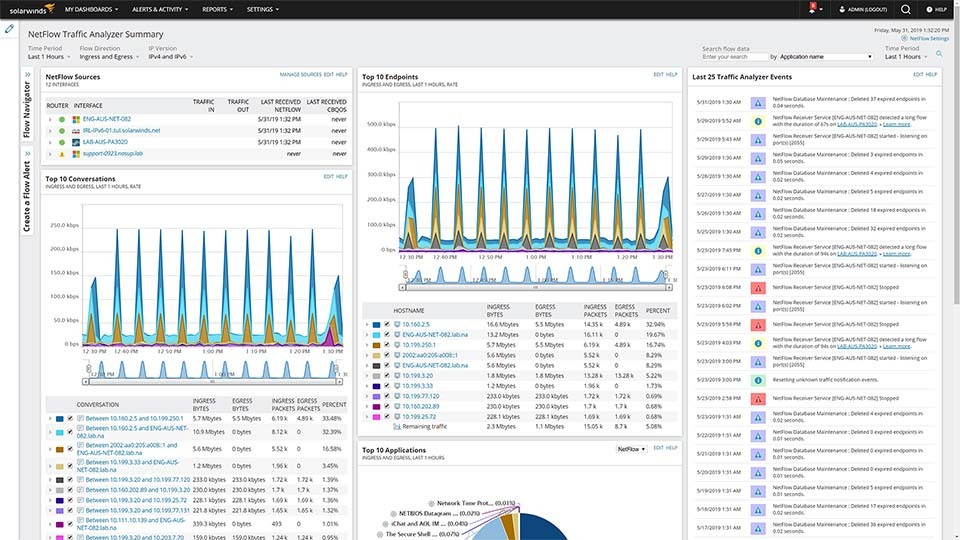
SolarWinds® NetFlow Traffic Analyzer (NTA) offers comprehensive traffic monitoring management tools designed for ease of use. With NTA you can retain all flow data provided by sources on your network, including flow data for ports that you are not actively monitoring. With this data available, you can easily drill down to see more information as needed—for instance, when you see a significant percentage of unmonitored traffic under Top XX Applications.
Additionally, SolarWinds NTA is built to automatically monitor flow packets even if one of the interfaces is not managed by SolarWinds® Network Performance Monitor (NPM). NetFlow management has plenty of monitoring options to ensure that you can easily see the data available from flow-enabled devices on your network.
SolarWinds® network traffic monitoring management tools can also allow for matching nodes by another IP address. This tool automatically associates a flow with an appropriate node, even if the node has multiple IP addresses and is sending flows from a non-primary address.
And if an unknown traffic event occurs, SolarWinds NTA is built to notify you immediately, providing a list of traffic events involving flow data received from an unmanaged interface.
You can also use NetFlow management to monitor interfaces for Wireless Controller nodes on the NetFlow sources widget.
With NTA, you can consolidate traffic data from across the network to simplify your overall bandwidth management and control. NTA parses this data into an easy-to-read, centralized interface, offering charts and graphs allowing you to easily view top talkers. You can also create ad hoc, customizable network traffic reports right from the dashboard to help you identify network traffic patterns and make changes before an incident occurs.
NetFlow monitoring software is designed to help you understand flow data from multiple vendors. NTA collects and analyzes flow data from vendors including Cisco® NBAR2 and NetFlow, Juniper J-Flow, IPFIX, sFlow, Huawei® NetStream, and more.
NTA also provides comprehensive support for the VMware® VDS, providing visibility within the switch fabric to your east-west VM traffic in order to help you avoid service impacts when moving workloads.
You can also reference existing IP groups and use those within NTA to view group traffic or compose custom applications.
Understanding bandwidth usage is key to maintaining fast network speeds and planning ahead for capacity changes. NetFlow helps you find the top network talkers using up your bandwidth, so you can resolve existing bottlenecks and be sure the most important applications for your business are getting bandwidth priority. With this information in hand, you can better optimize current network traffic usage and understand whether you need to add more bandwidth to your network as you plan for capacity moving forward.
Network traffic management is the process by which network admins gather, analyze, and act on traffic data, with the aim of optimizing how users and applications utilize a network’s bandwidth.
Effective network traffic management includes the following key elements:
SolarWinds® NTA makes it simple to figure out which applications are the top talkers on your network. You can easily check bandwidth usage across applications, protocols, or IP address groups.
Be proactive in tracking the cause of high bandwidth utilization through setting alerts. NTA offers out-of-the-box alerts including the High Receive Percent Utilization with Top Talkers and High Transmit Percent Utilization with Top Talkers, both with a default threshold of 75% utilization.
You can dig into alert-related events and analyze bandwidth utilization for a specific interface. Simply click My Dashboards, then go to NetFlow and click NTA Summary. Under NetFlow Sources, you can locate and expand the relevant node. Next, click the interface for which you received the bandwidth utilization alert. View the Top XX Endpoints for the interface.
From there, each endpoint in the list has a utilization percentage associated with it. You should quickly see here the endpoints responsible for the utilization alert along with the domain associated with the endpoint. View the Top XX Conversations to correlate the relevant items from the Top XX Endpoints list.
SolarWinds offers a range of network management and monitoring solutions based on your needs.
SolarWinds® Network Performance Monitor (NPM) is the perfect solution for medium and larger networks, providing multi-vendor network monitoring, along with network insights for even deeper visibility. This network monitoring tool also allows you to create intelligent maps and has easy troubleshooting capabilities. Advanced alerting means you can address problems as soon as they arise, helping to ensure less downtime.
SolarWinds Network Configuration Monitor (NCM) is built to reduce costs, save work hours, and help you remain compliant by providing automated network configuration management and backup. NCM also helps ensure your network configs are backed up, to help you get up and running more quickly should a problem occur. You can also work with templates to create “gold-standard” configs to roll out to new gear and obtain real-time change detection of config files. NCM also takes the effort out of managing numerous device configurations within a heterogeneous network, simplifying processes like scheduling regular backups, highlighting configuration errors, executing scripts, and maintaining organized configuration archives. Save time and effort by automating your network configuration management.
SolarWinds IP Address Manager (IPAM) can help save you time and prevent costly errors by automating your address tracking. Use IPAM’s capacity reporting to track subnet utilization and help with capacity planning. IPAM’s customizable subnet capacity template also makes for fast, flexible, and centralized reporting. And for categorizing your IP address space, IPAM’s Subnet Allocation Wizard in IPAM is designed to fit your network, no matter the size.
Network traffic management is the process by which network admins gather, analyze, and act on traffic data, with the aim of optimizing how users and applications utilize a network’s bandwidth.
Effective network traffic management includes the following key elements:
SolarWinds® NTA makes it simple to figure out which applications are the top talkers on your network. You can easily check bandwidth usage across applications, protocols, or IP address groups.
Be proactive in tracking the cause of high bandwidth utilization through setting alerts. NTA offers out-of-the-box alerts including the High Receive Percent Utilization with Top Talkers and High Transmit Percent Utilization with Top Talkers, both with a default threshold of 75% utilization.
You can dig into alert-related events and analyze bandwidth utilization for a specific interface. Simply click My Dashboards, then go to NetFlow and click NTA Summary. Under NetFlow Sources, you can locate and expand the relevant node. Next, click the interface for which you received the bandwidth utilization alert. View the Top XX Endpoints for the interface.
From there, each endpoint in the list has a utilization percentage associated with it. You should quickly see here the endpoints responsible for the utilization alert along with the domain associated with the endpoint. View the Top XX Conversations to correlate the relevant items from the Top XX Endpoints list.
SolarWinds offers a range of network management and monitoring solutions based on your needs.
SolarWinds® Network Performance Monitor (NPM) is the perfect solution for medium and larger networks, providing multi-vendor network monitoring, along with network insights for even deeper visibility. This network monitoring tool also allows you to create intelligent maps and has easy troubleshooting capabilities. Advanced alerting means you can address problems as soon as they arise, helping to ensure less downtime.
SolarWinds Network Configuration Monitor (NCM) is built to reduce costs, save work hours, and help you remain compliant by providing automated network configuration management and backup. NCM also helps ensure your network configs are backed up, to help you get up and running more quickly should a problem occur. You can also work with templates to create “gold-standard” configs to roll out to new gear and obtain real-time change detection of config files. NCM also takes the effort out of managing numerous device configurations within a heterogeneous network, simplifying processes like scheduling regular backups, highlighting configuration errors, executing scripts, and maintaining organized configuration archives. Save time and effort by automating your network configuration management.
SolarWinds IP Address Manager (IPAM) can help save you time and prevent costly errors by automating your address tracking. Use IPAM’s capacity reporting to track subnet utilization and help with capacity planning. IPAM’s customizable subnet capacity template also makes for fast, flexible, and centralized reporting. And for categorizing your IP address space, IPAM’s Subnet Allocation Wizard in IPAM is designed to fit your network, no matter the size.
NetFlow Traffic Analyzer
Collect and analyze flow data from across multiple vendors
Set bandwidth utilization alerts to quickly identify top talkers
Monitor network traffic consumption and plan for capacity changes