- Events
-
Partners
- Government
- Customer Portal
- Contact Us
- Contact Sales
-
English
Usually, only a couple of users or applications are responsible for your heaviest bandwidth usage. With SolarWinds NetFlow Traffic Analyzer (NTA), you can quickly identify which specific endpoints and applications are responsible for generating heavy Wi-Fi router traffic resulting in bottlenecks.
Use NTA to identify top talkers on your network, minimizing the impact of their bandwidth usage over time. With NTA, you can also track application traffic arriving from designated ports, source IPs, destination IPs, and protocols.
A Wi-Fi traffic monitor is a tool designed to determine whether your Wi-Fi traffic levels are typical for your existing wireless infrastructure. The goal of a wireless traffic monitor is to help manage bandwidth usage and Wi-Fi traffic to avoid unexpected traffic spikes and bottlenecks which seriously impact performance.
When it comes to finding a reliable Wi-Fi network traffic monitor, you should choose a tool that goes beyond simply showing Wi-Fi traffic spikes as they occur. You need a Wi-Fi traffic monitoring solution to measure traffic and give you actionable insights to help implement policy changes to maximize your wireless bandwidth capabilities.
Since your network relies on Wi-Fi every day to ensure remote, mobile, and wireless devices stay connected to internet access points and each other, Wi-Fi traffic monitoring is essential. When there are so many different devices constantly participating in networks and connecting to the internet, you can no longer guarantee reliable network uptime without taking steps to manage your wireless traffic and bandwidth.
A Wi-Fi bandwidth monitor can more effectively collect and synthesize data related to your Wi-Fi traffic and bandwidth use and includes visualization functionalities making it easier to find everything from traffic flows to bandwidth hogs.
The best monitoring solutions will also come with Wi-Fi traffic control features for anticipating and preventing traffic spikes and bottlenecks, leading to downtime and performance problems. With a quality Wi-Fi bandwidth monitor, you can take proactive remediating actions before wireless performance is severely impacted and ultimately help your organization run more smoothly.
Manual Wi-Fi traffic monitoring can result in surface-level data, which rarely offers insights designed to be used at scale.
However, with a wireless traffic monitor, you can get network traffic measurements to see the amount and type of traffic existing on your wireless network. This information can help manage bandwidth more effectively to prevent outages. A Wi-Fi traffic monitor can also help trace your Wi-Fi traffic, enabling you to see how the traffic reaches its intended destination. By better understanding the route packets take over your network, a Wi-Fi traffic monitor can also help you diagnose issues and take proactive measures to improve the performance of your wireless network.
The first step in monitoring Wi-Fi traffic is understanding what issues you are trying to solve or monitor. Maybe you’re trying to monitor traffic to servers, firewalls, or other devices, or perhaps you’re looking for insight into specific issues like packet loss or bandwidth. And by concentrating on a particular goal, you can focus on the most meaningful metrics essential to your Wi-Fi traffic monitoring activities.
Since unreliable or weak Wi-Fi, dropped Wi-Fi signals, and delayed response times are most often tied to connection speed, network security, and capacity, preventing downtime and outages means staying on top of these categories to spot potential problems. Some of the critical issues you should monitor for insight into Wi-Fi traffic include:
Poor connection speeds: Slow inter-device connections and slow internet are frequently the results of noise. Noise can be anything interfering with Wi-Fi waveforms and preventing them from successfully carrying a signal.
Weak signal strength: Weak signals can prevent network servers, web browsers, and applications from performing at the highest possible level. Noise can interfere with your signal strength, as can physical materials surrounding routers, including buildings.
Mismanaged network capacity: Network bandwidth depends on the amount of traffic and the number of devices your wireless network can handle. If you aren’t using additional access points or understand device connections, you might find your connection speeds dropping fast.
Manually monitoring Wi-Fi traffic—even if you only focus on these key elements—can still be challenging. The best way to monitor your Wi-Fi traffic is by using a Wi-Fi bandwidth monitor like SolarWinds NetFlow Traffic Analyzer.
SolarWinds NetFlow Traffic Analyzer (NTA) functions as a Wi-Fi bandwidth monitor helping you identify the causes of high usage to improve wireless performance and prevent downtime and outages. As an add-on to SolarWinds Network Performance Monitor, NTA offers Wi-Fi network traffic analysis, bandwidth monitoring, application traffic alerting, advanced application recognition, VMware vSphere distributed switch support, and much more to help ensure optimal uptime and performance of your wireless network.
NTA constantly monitors your Wi-Fi network to help you understand where the problems leading to downtime and bottlenecks are occurring, so you can take proactive steps to address those issues. NTA analysis features analyze and understand patterns and trends in your Wi-Fi traffic over the course of minutes, days, weeks, or months by drilling into the specific elements of your network you want to investigate.
Beyond simplifying and enhancing the Wi-Fi traffic monitoring and analysis process, NTA also lets you create customizable Wi-Fi network traffic reports to see the metrics and insights you need without getting overwhelmed with unrelated details. With NTA, you can review historical data to detect peak Wi-Fi usage and adjust policies for better management. By analyzing Wi-Fi traffic to identify the cause of network bottlenecks, you can also detect the specific apps and endpoints taking up the most network bandwidth.
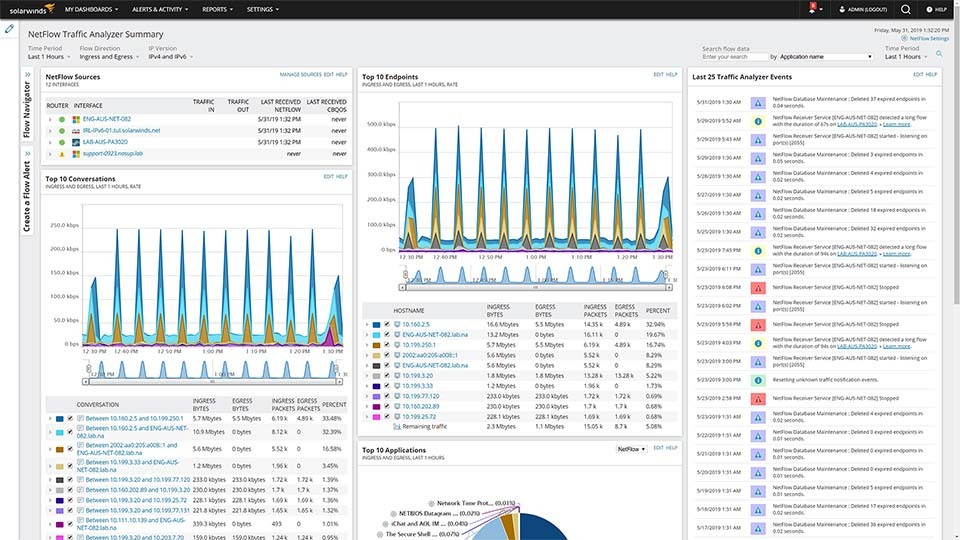
NTA provides deep visibility into your Wi-Fi traffic with the Wi-Fi network traffic monitor and analysis dashboard, which delivers a customizable, comprehensive view of your wireless network traffic in a single pane of glass. This visibility can let you spot potential problems quickly with the aid of top-ten views of Wi-Fi network traffic data.
NTA also comes with a built-in sophisticated alerting system to tell you when your application declines, spikes, or disappears, so you can immediately take targeted steps to remediate the issue.
A Wi-Fi traffic monitor is a tool designed to determine whether your Wi-Fi traffic levels are typical for your existing wireless infrastructure. The goal of a wireless traffic monitor is to help manage bandwidth usage and Wi-Fi traffic to avoid unexpected traffic spikes and bottlenecks which seriously impact performance.
When it comes to finding a reliable Wi-Fi network traffic monitor, you should choose a tool that goes beyond simply showing Wi-Fi traffic spikes as they occur. You need a Wi-Fi traffic monitoring solution to measure traffic and give you actionable insights to help implement policy changes to maximize your wireless bandwidth capabilities.
Since your network relies on Wi-Fi every day to ensure remote, mobile, and wireless devices stay connected to internet access points and each other, Wi-Fi traffic monitoring is essential. When there are so many different devices constantly participating in networks and connecting to the internet, you can no longer guarantee reliable network uptime without taking steps to manage your wireless traffic and bandwidth.
A Wi-Fi bandwidth monitor can more effectively collect and synthesize data related to your Wi-Fi traffic and bandwidth use and includes visualization functionalities making it easier to find everything from traffic flows to bandwidth hogs.
The best monitoring solutions will also come with Wi-Fi traffic control features for anticipating and preventing traffic spikes and bottlenecks, leading to downtime and performance problems. With a quality Wi-Fi bandwidth monitor, you can take proactive remediating actions before wireless performance is severely impacted and ultimately help your organization run more smoothly.
Manual Wi-Fi traffic monitoring can result in surface-level data, which rarely offers insights designed to be used at scale.
However, with a wireless traffic monitor, you can get network traffic measurements to see the amount and type of traffic existing on your wireless network. This information can help manage bandwidth more effectively to prevent outages. A Wi-Fi traffic monitor can also help trace your Wi-Fi traffic, enabling you to see how the traffic reaches its intended destination. By better understanding the route packets take over your network, a Wi-Fi traffic monitor can also help you diagnose issues and take proactive measures to improve the performance of your wireless network.
The first step in monitoring Wi-Fi traffic is understanding what issues you are trying to solve or monitor. Maybe you’re trying to monitor traffic to servers, firewalls, or other devices, or perhaps you’re looking for insight into specific issues like packet loss or bandwidth. And by concentrating on a particular goal, you can focus on the most meaningful metrics essential to your Wi-Fi traffic monitoring activities.
Since unreliable or weak Wi-Fi, dropped Wi-Fi signals, and delayed response times are most often tied to connection speed, network security, and capacity, preventing downtime and outages means staying on top of these categories to spot potential problems. Some of the critical issues you should monitor for insight into Wi-Fi traffic include:
Poor connection speeds: Slow inter-device connections and slow internet are frequently the results of noise. Noise can be anything interfering with Wi-Fi waveforms and preventing them from successfully carrying a signal.
Weak signal strength: Weak signals can prevent network servers, web browsers, and applications from performing at the highest possible level. Noise can interfere with your signal strength, as can physical materials surrounding routers, including buildings.
Mismanaged network capacity: Network bandwidth depends on the amount of traffic and the number of devices your wireless network can handle. If you aren’t using additional access points or understand device connections, you might find your connection speeds dropping fast.
Manually monitoring Wi-Fi traffic—even if you only focus on these key elements—can still be challenging. The best way to monitor your Wi-Fi traffic is by using a Wi-Fi bandwidth monitor like SolarWinds NetFlow Traffic Analyzer.
SolarWinds NetFlow Traffic Analyzer (NTA) functions as a Wi-Fi bandwidth monitor helping you identify the causes of high usage to improve wireless performance and prevent downtime and outages. As an add-on to SolarWinds Network Performance Monitor, NTA offers Wi-Fi network traffic analysis, bandwidth monitoring, application traffic alerting, advanced application recognition, VMware vSphere distributed switch support, and much more to help ensure optimal uptime and performance of your wireless network.
NTA constantly monitors your Wi-Fi network to help you understand where the problems leading to downtime and bottlenecks are occurring, so you can take proactive steps to address those issues. NTA analysis features analyze and understand patterns and trends in your Wi-Fi traffic over the course of minutes, days, weeks, or months by drilling into the specific elements of your network you want to investigate.
Beyond simplifying and enhancing the Wi-Fi traffic monitoring and analysis process, NTA also lets you create customizable Wi-Fi network traffic reports to see the metrics and insights you need without getting overwhelmed with unrelated details. With NTA, you can review historical data to detect peak Wi-Fi usage and adjust policies for better management. By analyzing Wi-Fi traffic to identify the cause of network bottlenecks, you can also detect the specific apps and endpoints taking up the most network bandwidth.
NTA provides deep visibility into your Wi-Fi traffic with the Wi-Fi network traffic monitor and analysis dashboard, which delivers a customizable, comprehensive view of your wireless network traffic in a single pane of glass. This visibility can let you spot potential problems quickly with the aid of top-ten views of Wi-Fi network traffic data.
NTA also comes with a built-in sophisticated alerting system to tell you when your application declines, spikes, or disappears, so you can immediately take targeted steps to remediate the issue.
NetFlow Traffic Analyzer
Monitor wireless bandwidth use by application, protocol, and IP address group.
Get alerted if application traffic suddenly increases, decreases, or disappears completely.
Analyze network traffic patterns over months, weeks, days, or minutes by drilling down into any network element.