- Events
-
Partners
- Government
- Customer Portal
- Contact Us
- Contact Sales
-
English
NetFlow analysis is the process of collecting and monitoring network traffic to perform in-depth inspection and interpretation of traffic flow information, which can help you build a broad, overall picture of traffic flow and reveal useful insights regarding traffic source and destination, causes of congestion, and classes of service.
NetFlow analysis is also an integral part of deciding how and where to best apply Quality of Service (QoS) policies. It plays an important role in network security, as it can be used to detect Distributed Denial of Service (or DDoS) attacks, unauthorized activity, and improper network events that could be signs of a cyberattack.
NetFlow analysis and monitoring is an efficient way to collect and retain data related to network applications, communication traffic, endpoints, and users.
With any network, it can become expensive and inefficient to manually analyze packet capture (or pcap) data. By collecting and organizing data packets according to IP address, protocol, and transport port—creating compact record files, performing NetFlow analysis can help you more easily focus and simplify your network and security monitoring efforts.
Analyzing flow data records can also help inform many different purposes, including accounting and network forensics. Users can leverage flow data records to help identify data exfiltration, DDoS attacks, misconfigured network devices, and network scans originating from external sources.
Cisco NetFlow analyzers are designed to offer more functionality than simple packet and byte aggregation solutions, which includes providing greater insights into traffic and supporting faster troubleshooting with comprehensive data correlation features.
Manually performing traffic analysis across different data types can be a time-consuming process typically requiring multiple tools to gain different metrics, normalize this data, and create a consolidate view.
There are three primary components to a Cisco NetFlow analyzer monitoring system. These include a flow exporter, a flow collector, and an analysis application. A flow exporter is responsible for aggregating data packets into flows and exporting records of those flows towards flow collectors. Flow collectors are responsible for receiving, storing, and preparing flow data from flow exporters for processing. Analysis applications are responsible for analyzing the flow data received from flow collectors for signs of intrusion or malicious traffic profiles.
Using a NetFlow analyzer to understand traffic flow data can help you better determine causes of bottlenecks and overall traffic volume, both of which play an important role in capacity planning and ensuring resources are adequately provisioned and properly allocated as an organization scales.
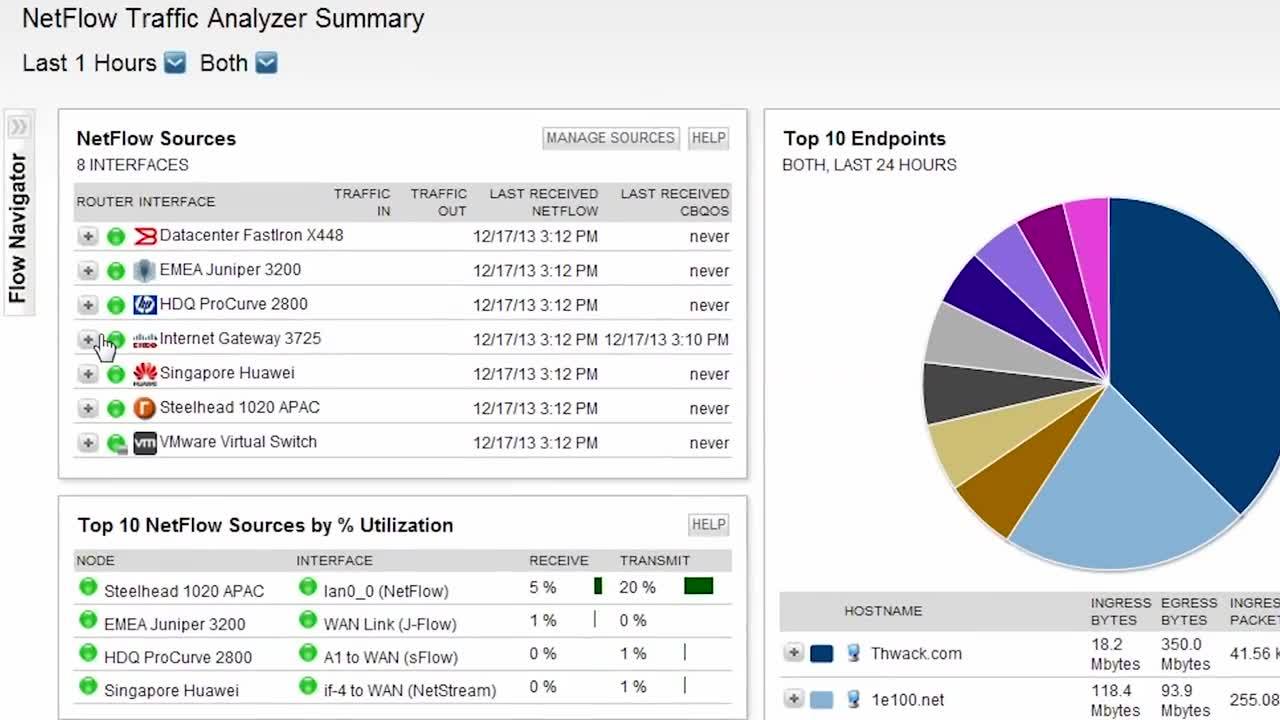
SolarWinds NetFlow Traffic Analyzer is designed to allows users to monitor network bandwidth and traffic patterns in real time and over time. NTA not only collects flow NetFlow v5 and v9 data from Cisco routers and switches but can also collect and analyze data generated by Huawei NetStream, IPFIX, Juniper J-Flow, and sFlow. NTA’s NetFlow analyzer can also help you locate the root causes of high bandwidth usage and convert flow data into tables and charts to categorize and quantify who is using the network, how much they’re using it, and for what purpose.
NTA helps make network monitoring easier and accessible by centralizing a comprehensive view of multiple data streams and traffic metrics into a single user dashboard. The application’s intuitive interface allows you to drill down on network traffic data with a few clicks—which can help provide in-depth network forensics analytics on the traffic moving through network elements and enabling users to isolate unexpected traffic or excessive bandwidth usage.
NTA is built to grant critical visibility into bandwidth utilization and offers a powerful alerting system to keep admins up to date on overall network usage. NTA can instantly send alerts when interfaces exceed utilization thresholds and will also provide information on top talkers, so you can catch the applications using the most bandwidth.
You can use NTA’s Flow Navigator filters to quickly sort network traffic for customizable views on traffic data, so you can more easily locate the source of bandwidth usage based on application, IP address, or protocol and identify whether network slowdowns are related to business use or personal usage.
SolarWinds NetFlow Traffic Analyzer is built to be used with SolarWinds Network Performance Monitor (NPM) to allow flow data to be quickly compared against other network performance metrics for easier data correlation. For even deeper visibility, NPM can be included in the Orion Platform, which is a common technology platform supporting several SolarWinds products to provide a centralized view and experience for monitoring and managing your network, storage, systems, and virtualization environments all from a single dashboard. You can try both products free for 30 days by downloading Network Bandwidth Analyzer Pack.
NetFlow analysis is the process of collecting and monitoring network traffic to perform in-depth inspection and interpretation of traffic flow information, which can help you build a broad, overall picture of traffic flow and reveal useful insights regarding traffic source and destination, causes of congestion, and classes of service.
NetFlow analysis is also an integral part of deciding how and where to best apply Quality of Service (QoS) policies. It plays an important role in network security, as it can be used to detect Distributed Denial of Service (or DDoS) attacks, unauthorized activity, and improper network events that could be signs of a cyberattack.
NetFlow analysis and monitoring is an efficient way to collect and retain data related to network applications, communication traffic, endpoints, and users.
With any network, it can become expensive and inefficient to manually analyze packet capture (or pcap) data. By collecting and organizing data packets according to IP address, protocol, and transport port—creating compact record files, performing NetFlow analysis can help you more easily focus and simplify your network and security monitoring efforts.
Analyzing flow data records can also help inform many different purposes, including accounting and network forensics. Users can leverage flow data records to help identify data exfiltration, DDoS attacks, misconfigured network devices, and network scans originating from external sources.
Cisco NetFlow analyzers are designed to offer more functionality than simple packet and byte aggregation solutions, which includes providing greater insights into traffic and supporting faster troubleshooting with comprehensive data correlation features.
Manually performing traffic analysis across different data types can be a time-consuming process typically requiring multiple tools to gain different metrics, normalize this data, and create a consolidate view.
There are three primary components to a Cisco NetFlow analyzer monitoring system. These include a flow exporter, a flow collector, and an analysis application. A flow exporter is responsible for aggregating data packets into flows and exporting records of those flows towards flow collectors. Flow collectors are responsible for receiving, storing, and preparing flow data from flow exporters for processing. Analysis applications are responsible for analyzing the flow data received from flow collectors for signs of intrusion or malicious traffic profiles.
Using a NetFlow analyzer to understand traffic flow data can help you better determine causes of bottlenecks and overall traffic volume, both of which play an important role in capacity planning and ensuring resources are adequately provisioned and properly allocated as an organization scales.
SolarWinds NetFlow Traffic Analyzer is designed to allows users to monitor network bandwidth and traffic patterns in real time and over time. NTA not only collects flow NetFlow v5 and v9 data from Cisco routers and switches but can also collect and analyze data generated by Huawei NetStream, IPFIX, Juniper J-Flow, and sFlow. NTA’s NetFlow analyzer can also help you locate the root causes of high bandwidth usage and convert flow data into tables and charts to categorize and quantify who is using the network, how much they’re using it, and for what purpose.
NTA helps make network monitoring easier and accessible by centralizing a comprehensive view of multiple data streams and traffic metrics into a single user dashboard. The application’s intuitive interface allows you to drill down on network traffic data with a few clicks—which can help provide in-depth network forensics analytics on the traffic moving through network elements and enabling users to isolate unexpected traffic or excessive bandwidth usage.
NTA is built to grant critical visibility into bandwidth utilization and offers a powerful alerting system to keep admins up to date on overall network usage. NTA can instantly send alerts when interfaces exceed utilization thresholds and will also provide information on top talkers, so you can catch the applications using the most bandwidth.
You can use NTA’s Flow Navigator filters to quickly sort network traffic for customizable views on traffic data, so you can more easily locate the source of bandwidth usage based on application, IP address, or protocol and identify whether network slowdowns are related to business use or personal usage.
SolarWinds NetFlow Traffic Analyzer is built to be used with SolarWinds Network Performance Monitor (NPM) to allow flow data to be quickly compared against other network performance metrics for easier data correlation. For even deeper visibility, NPM can be included in the Orion Platform, which is a common technology platform supporting several SolarWinds products to provide a centralized view and experience for monitoring and managing your network, storage, systems, and virtualization environments all from a single dashboard. You can try both products free for 30 days by downloading Network Bandwidth Analyzer Pack.
NetFlow Traffic Analyzer
Perform NetFlow analysis for insights into applications, protocols, and IP address groups.
Get alerted if application traffic suddenly increases, decreases, or disappears completely.
With NetFlow analysis, you can get insight over months, days, or minutes by drilling down into any network element.