- Events
-
Partners
- Government
- Customer Portal
- Contact Us
- Contact Sales
-
English
Network congestion occurs when a network node becomes overwhelmed with traffic and can be a common problem for admins.
Network traffic often occurs because of how the internet is designed. Internet traffic is controlled by the Border Gateway Protocol (BGP), which is an algorithm designed to determine the path of internet traffic. BGP will direct traffic along the shortest possible distance, not the fastest path or the path with the most bandwidth. As such, all data follows the same short path. During low-to-moderate traffic periods, this approach works well. However, if too much data tries to follow the same path, it’ll cause network congestion.
Network congestion is closely related to latency, throughput, and bandwidth. Latency refers to the speed of your network traffic measured in milliseconds, and high latency numbers indicate a slower network. Acceptable latency numbers vary by application and network connection uses—for instance, video calls tend to require low latency.
Throughput is an actual measure of how much data successfully makes it from source to destination in a set amount of time, while bandwidth is a measure of ideal capacity, that is, how much data could be transferred from source to destination in a certain amount of time. Throughput directly measures speed while bandwidth is only indirectly related to speed. When there isn’t enough bandwidth on your network to handle all traffic moving along the shortest path, latency increases and throughput decreases. Network congestion can also cause timeouts and packet loss.
It’s impossible to eliminate network congestion altogether, but there are many ways to reduce it. Congestion management refers to any formalized strategy designed to avoid, reduce, or temporarily eliminate network congestion and its effects on the network. These types of network congestion solutions are comprised of a mechanism designed to lessen the impact of the congestion, and a detection trigger to turn on the mechanism. However, network congestion solutions taking this approach vary widely in terms of effectiveness and complexity. For accurate and actionable insights, admins can use network congestion monitoring tools to perform a network congestion test.
Network congestion monitoring is important for three main reasons. First, network congestion is an incredibly common issue. Even the most well-designed and well-provisioned networks experience slowdowns. For instance, the highest network usage periods in an enterprise are typically the beginning of the day, the beginning of the week, and just before the workday ends. There may also be unexpected spikes in traffic. As such, there are numerous opportunities for bottlenecks and performance issues.
Network congestion monitoring tools are important because they help you reduce network congestion when it happens and prevent it in the future. If your network is a slow and you suspect it’s congested, you can run a network congestion test like a ping or LAN performance test and pinpoint the source of the congestion. Troubleshooting becomes even faster if you practice comprehensive network congestion monitoring. If you keep an eye on your network traffic at all times and know which applications or endpoints cause the most congestion, you know exactly where to look first when network congestion occurs.
Second, network congestion can drastically affect your enterprise’s business productivity. Remote work is on the rise—today more businesses than ever before perform business-critical operations over the internet and rely on VoIP calls and applications. Network congestion wreaks havoc with your connection and even temporary downtime can compromise your ability to operate quickly and satisfy your customers. Network monitoring helps you resolve network congestion quickly, so you get back to work.
Finally, network congestion monitoring is important because it can help you improve network security. Network congestion can mean a hacker is trying to gain access to your network, but a sudden decrease or total loss of traffic can also indicate malicious activity. Network congestion solutions establish network traffic baselines—and any significant deviation from the norm could be cause for investigation.
Network congestion can drastically impact network performance because it affects everything your enterprise does that takes place over the internet, from streaming to VoIP calls to email delivery.
Since all applications, endpoints, and online services interacting with the internet do so in the same way—data follows the shortest path—all applications, endpoints, and online services are susceptible to congestion when the pathway inevitably becomes clogged.
This can affect your network performance in various ways. Applications slow down, connections drop out, VoIP calls go in and out due to patchy audio quality, emails don’t make it to their recipients, and more. Network performance caused by network congestion is also problematic if your enterprise frequently interfaces with customers. If your site is laggy due to network performance issues, your customers might take their business elsewhere.
Common network congestion causes include:
There are many different causes of network congestion and just as many ways to troubleshoot them. Network congestion solutions can help to resolve network congestion as quickly and effectively as possible.
Although the previously mentioned network congestion causes are much more common, cyberattacks can cause network congestion. Viruses, worms, and Designated Denial of Service (DDoS) are the most common cyberattacks known to cause network congestion.
A DDoS attack is a cyberattack where many different computers attack a target, like a server, at the same time and force a denial of service for users of the target. The hacker floods the target with so many messages, connection requests, and packets the system cannot keep up with them all. The system either slows down considerably to process requests or shuts down altogether, preventing users from accessing the target.
DDoS attacks are almost impossible to prevent, but admins can minimize their impact by using network congestion monitoring tools. If a network congestion solution alerts them to a suspicious spike in network traffic indicating a DDoS attack, they can investigate, act, and mitigate the attack’s effects.
Network congestion occurs when a network node becomes overwhelmed with traffic and can be a common problem for admins.
Network traffic often occurs because of how the internet is designed. Internet traffic is controlled by the Border Gateway Protocol (BGP), which is an algorithm designed to determine the path of internet traffic. BGP will direct traffic along the shortest possible distance, not the fastest path or the path with the most bandwidth. As such, all data follows the same short path. During low-to-moderate traffic periods, this approach works well. However, if too much data tries to follow the same path, it’ll cause network congestion.
Network congestion is closely related to latency, throughput, and bandwidth. Latency refers to the speed of your network traffic measured in milliseconds, and high latency numbers indicate a slower network. Acceptable latency numbers vary by application and network connection uses—for instance, video calls tend to require low latency.
Throughput is an actual measure of how much data successfully makes it from source to destination in a set amount of time, while bandwidth is a measure of ideal capacity, that is, how much data could be transferred from source to destination in a certain amount of time. Throughput directly measures speed while bandwidth is only indirectly related to speed. When there isn’t enough bandwidth on your network to handle all traffic moving along the shortest path, latency increases and throughput decreases. Network congestion can also cause timeouts and packet loss.
It’s impossible to eliminate network congestion altogether, but there are many ways to reduce it. Congestion management refers to any formalized strategy designed to avoid, reduce, or temporarily eliminate network congestion and its effects on the network. These types of network congestion solutions are comprised of a mechanism designed to lessen the impact of the congestion, and a detection trigger to turn on the mechanism. However, network congestion solutions taking this approach vary widely in terms of effectiveness and complexity. For accurate and actionable insights, admins can use network congestion monitoring tools to perform a network congestion test.
Network congestion monitoring is important for three main reasons. First, network congestion is an incredibly common issue. Even the most well-designed and well-provisioned networks experience slowdowns. For instance, the highest network usage periods in an enterprise are typically the beginning of the day, the beginning of the week, and just before the workday ends. There may also be unexpected spikes in traffic. As such, there are numerous opportunities for bottlenecks and performance issues.
Network congestion monitoring tools are important because they help you reduce network congestion when it happens and prevent it in the future. If your network is a slow and you suspect it’s congested, you can run a network congestion test like a ping or LAN performance test and pinpoint the source of the congestion. Troubleshooting becomes even faster if you practice comprehensive network congestion monitoring. If you keep an eye on your network traffic at all times and know which applications or endpoints cause the most congestion, you know exactly where to look first when network congestion occurs.
Second, network congestion can drastically affect your enterprise’s business productivity. Remote work is on the rise—today more businesses than ever before perform business-critical operations over the internet and rely on VoIP calls and applications. Network congestion wreaks havoc with your connection and even temporary downtime can compromise your ability to operate quickly and satisfy your customers. Network monitoring helps you resolve network congestion quickly, so you get back to work.
Finally, network congestion monitoring is important because it can help you improve network security. Network congestion can mean a hacker is trying to gain access to your network, but a sudden decrease or total loss of traffic can also indicate malicious activity. Network congestion solutions establish network traffic baselines—and any significant deviation from the norm could be cause for investigation.
Network congestion can drastically impact network performance because it affects everything your enterprise does that takes place over the internet, from streaming to VoIP calls to email delivery.
Since all applications, endpoints, and online services interacting with the internet do so in the same way—data follows the shortest path—all applications, endpoints, and online services are susceptible to congestion when the pathway inevitably becomes clogged.
This can affect your network performance in various ways. Applications slow down, connections drop out, VoIP calls go in and out due to patchy audio quality, emails don’t make it to their recipients, and more. Network performance caused by network congestion is also problematic if your enterprise frequently interfaces with customers. If your site is laggy due to network performance issues, your customers might take their business elsewhere.
Common network congestion causes include:
There are many different causes of network congestion and just as many ways to troubleshoot them. Network congestion solutions can help to resolve network congestion as quickly and effectively as possible.
Although the previously mentioned network congestion causes are much more common, cyberattacks can cause network congestion. Viruses, worms, and Designated Denial of Service (DDoS) are the most common cyberattacks known to cause network congestion.
A DDoS attack is a cyberattack where many different computers attack a target, like a server, at the same time and force a denial of service for users of the target. The hacker floods the target with so many messages, connection requests, and packets the system cannot keep up with them all. The system either slows down considerably to process requests or shuts down altogether, preventing users from accessing the target.
DDoS attacks are almost impossible to prevent, but admins can minimize their impact by using network congestion monitoring tools. If a network congestion solution alerts them to a suspicious spike in network traffic indicating a DDoS attack, they can investigate, act, and mitigate the attack’s effects.
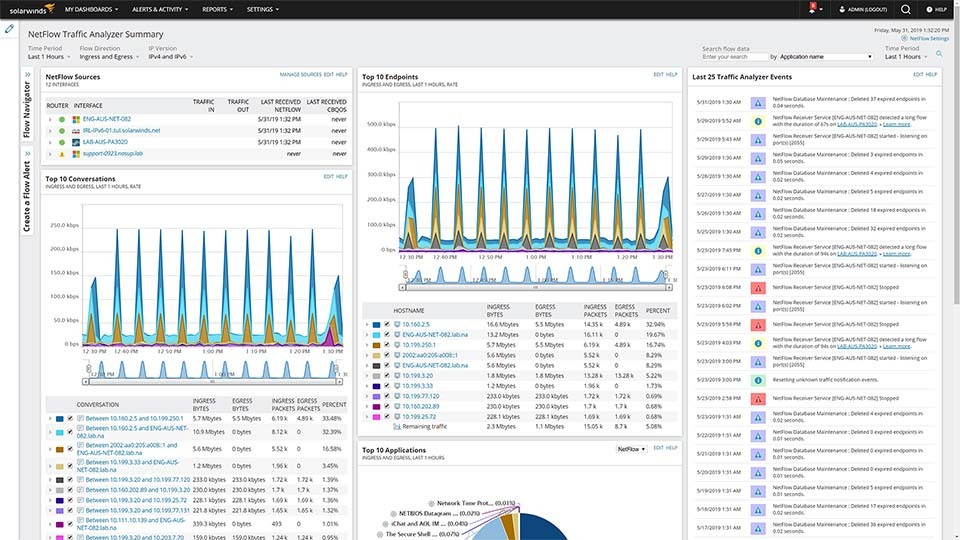
NetFlow Traffic Analyzer
Monitor bandwidth use by application, protocol, and IP address group to reduce network congestion.
Get alerted if application traffic suddenly increases, decreases, or disappears completely.
Analyze network congestion causes over time by drilling down on any network element.