- Events
-
Partners
- Government
- Customer Portal
- Contact Us
- Contact Sales
-
English
No matter what’s causing slowdowns in SQL Server or another database, it’s important for you to get to the bottom of the problem fast, so it doesn’t affect the user experience.
The Response Time Analysis (RTA) feature in SolarWinds® Database Performance Analyzer (DPA) is designed to help you more easily identify the internal and external server fragmentation causing slow queries, locate blocking, and pinpoint the root causes of bottlenecks. You can work with real-time and historic monitoring data to set a baseline for performance. RTA is built to measure database performance from end-user query through response, empowering DBAs to select defrag strategies based on end-user impact.
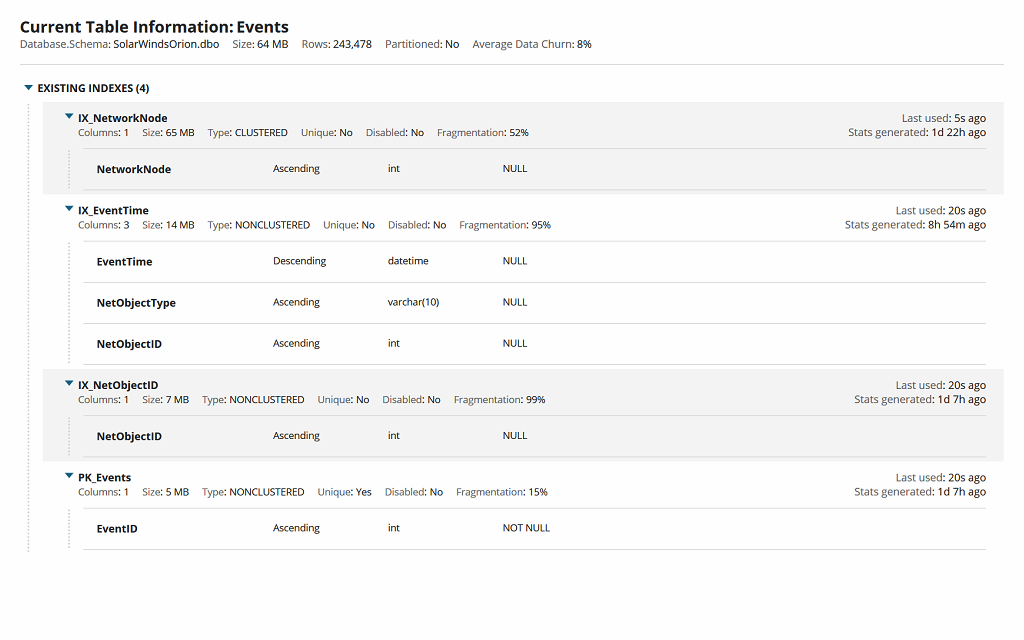
Effective database performance tuning often relies on having precise database insights to determine actual root causes. With the SQL performance analyzer in DPA, DBAs can check SQL index fragmentation on the server and get pinpointed advice about wait times, SQL statements, and the actual workload—across the past five seconds or five years—they can then use to tune indexes and queries.
DPA is also designed to help identify high-impact and inefficient T-SQL to help you prioritize crucial action items. These insights can help DBAs go beyond resource utilization and hardware add-ons to more effectively tune SQL Server performance for speed.
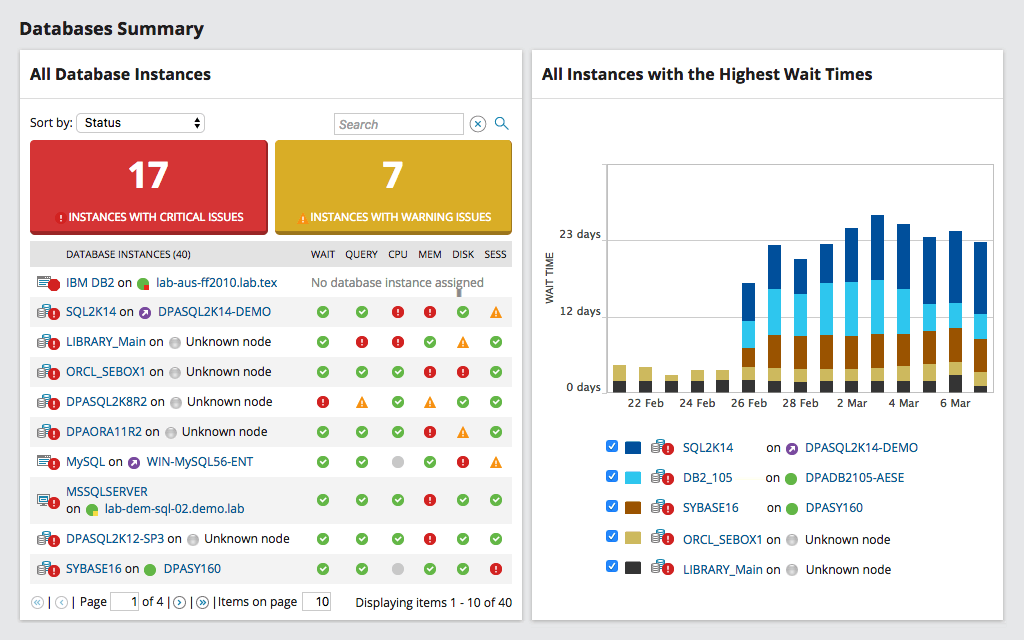
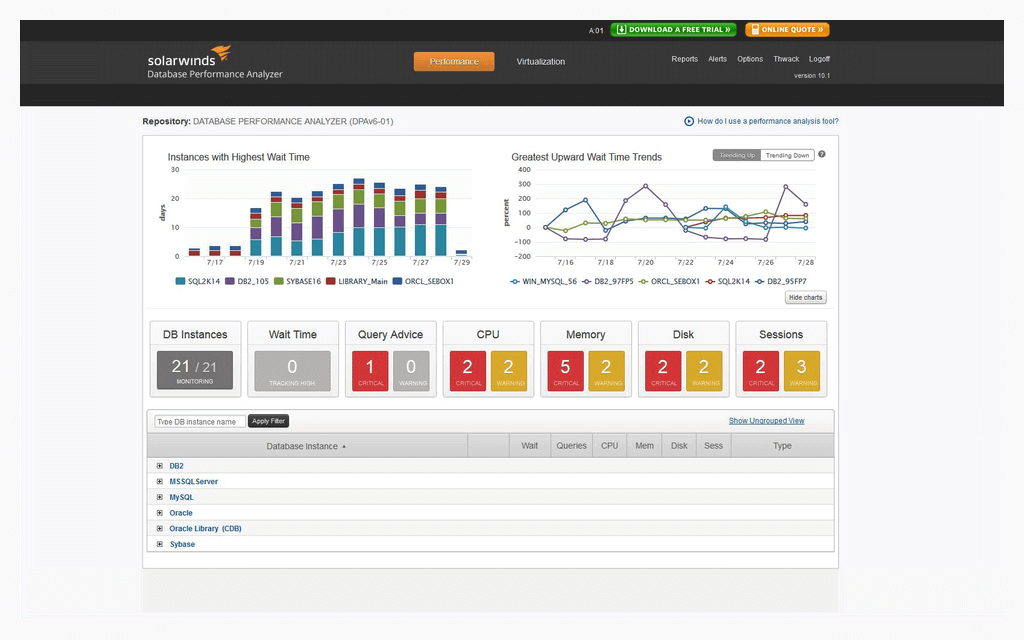
When it comes to addressing SQL Server index fragmentation and performance tuning, visibility is critical. SolarWinds Database Performance Analyzer makes it easier to check the fragmentation of SQL Server through an intuitive dashboard offering a unified view also shareable across stakeholders. The system can help you quickly see the correlation between response time and system resources.
DPA also offers SQL index fragmentation report capabilities, allowing DBAs to customize reports, view deadlock resolutions, and proactively address capacity constraints and slowdowns caused by fragmentation.
Index fragmentation can occur throughout the lifetime of an index, typically as the data in an index gets modified. Whether these modifications are insertions, deletions, or updates, they can cause the index to become fragmented.
To understand index fragmentation, you need to first understand the index itself. Indexes are created on columns in views or tables. Their orderly structure is designed to make it easier for you to look up and locate the data you need based on the values of those columns.
When index fragmentation occurs, data retrieval—which is critical to database functionality—can become significantly slower and less efficient. The performance degradation caused by index fragmentation can also seriously affect end users, whether they’re employees or customers.
A B-tree structure is used to store the indexes on the disk. Indexes are on-disk structures. They’re made up of keys pointing to either one of the multiple columns within the view or table. After you first create an index on a column, you can then search for the row you need based on the numbers in the index. The server conducts the search for you, first finding the necessary value in the index and then using the index itself to find the row data it’s looking for in the database. If you didn’t have an index, this process would be much slower, since the server would need to conduct a full table scan to locate the row data it needs. This would be a much slower process and require substantially more I/O.
Most of the time when referring to index fragmentation, what people are referring to is fragmentation occurring in SQL Server.
SQL Server index fragmentation commonly involves two main types:
Checking for and reducing index fragmentation can help you more efficiently tune indexes to improve SQL Server performance. Without insight into index fragmentation, users may experience database slowdowns. Other issues monitoring for index fragmentation can help inform include the following:
Unfortunately, there isn’t a way to entirely avoid index fragmentation—but you can take steps to optimize indexation. One way to optimize indexation is to stay proactive in addressing SQL Server index fragmentation and other issues within your database.
There are two main ways to deal with SQL Server index fragmentation: rebuilding or reorganizing the index. The basics of each process are as follows:
Once either of these defragmentation processes is completed, the index should once again be contiguous, allowing for more efficient and faster access.
One of the ways you can more easily optimize your index is by using a tool like SolarWinds® Database Performance Analyzer (DPA). DPA is built to constantly monitor your database, so you can more easily identify fragmented indexes. Additionally, DPA can alert you to anomalies and offers actionable advice on how to resolve problems, including tuning your indexes.
DPA is an index fragmentation tool designed to check the fragmentation of SQL Server and other databases.
As a database performance optimization solution, the tool helps with addressing SQL Server index fragmentation, query tuning, and other database optimization best practices. DPA gives you a powerful solution built to monitor performance issues within your index thanks to SQL index fragmentation reports, customizable alerts, and actionable advice to better inform your SQL Server index fragmentation query tuning efforts.
When it comes to addressing SQL Server index fragmentation, Database Performance Analyzer can help you do the following:
Index fragmentation can occur throughout the lifetime of an index, typically as the data in an index gets modified. Whether these modifications are insertions, deletions, or updates, they can cause the index to become fragmented.
To understand index fragmentation, you need to first understand the index itself. Indexes are created on columns in views or tables. Their orderly structure is designed to make it easier for you to look up and locate the data you need based on the values of those columns.
When index fragmentation occurs, data retrieval—which is critical to database functionality—can become significantly slower and less efficient. The performance degradation caused by index fragmentation can also seriously affect end users, whether they’re employees or customers.
A B-tree structure is used to store the indexes on the disk. Indexes are on-disk structures. They’re made up of keys pointing to either one of the multiple columns within the view or table. After you first create an index on a column, you can then search for the row you need based on the numbers in the index. The server conducts the search for you, first finding the necessary value in the index and then using the index itself to find the row data it’s looking for in the database. If you didn’t have an index, this process would be much slower, since the server would need to conduct a full table scan to locate the row data it needs. This would be a much slower process and require substantially more I/O.
Most of the time when referring to index fragmentation, what people are referring to is fragmentation occurring in SQL Server.
SQL Server index fragmentation commonly involves two main types:
Checking for and reducing index fragmentation can help you more efficiently tune indexes to improve SQL Server performance. Without insight into index fragmentation, users may experience database slowdowns. Other issues monitoring for index fragmentation can help inform include the following:
Unfortunately, there isn’t a way to entirely avoid index fragmentation—but you can take steps to optimize indexation. One way to optimize indexation is to stay proactive in addressing SQL Server index fragmentation and other issues within your database.
There are two main ways to deal with SQL Server index fragmentation: rebuilding or reorganizing the index. The basics of each process are as follows:
Once either of these defragmentation processes is completed, the index should once again be contiguous, allowing for more efficient and faster access.
One of the ways you can more easily optimize your index is by using a tool like SolarWinds® Database Performance Analyzer (DPA). DPA is built to constantly monitor your database, so you can more easily identify fragmented indexes. Additionally, DPA can alert you to anomalies and offers actionable advice on how to resolve problems, including tuning your indexes.
DPA is an index fragmentation tool designed to check the fragmentation of SQL Server and other databases.
As a database performance optimization solution, the tool helps with addressing SQL Server index fragmentation, query tuning, and other database optimization best practices. DPA gives you a powerful solution built to monitor performance issues within your index thanks to SQL index fragmentation reports, customizable alerts, and actionable advice to better inform your SQL Server index fragmentation query tuning efforts.
When it comes to addressing SQL Server index fragmentation, Database Performance Analyzer can help you do the following:
Database Performance Analyzer
Gain insights into SQL Server index fragmentation issues, so you can begin resolving them before they affect end users.
Monitor database performance and receive customizable alerts for more proactive, informed tuning.
Access advice and prioritized action items for addressing SQL Server index fragmentation issues.