- Events
-
Partners
- Government
- Customer Portal
- Contact Us
- Contact Sales
-
English
Designed for enterprise grid computing and safe data storage and retrieval, Oracle Database is a top Relational Database Management System (RDBMS) for many organizations, and it’s important to take steps to manage and optimize its performance.
To improve your Oracle database’s performance, reduce operational costs, stay compliant with regulations, and reduce the risk of data breaches, you’ll need to engage in Oracle database management and SQL tuning. This involves carefully monitoring your Oracle database’s resource consumption and consistently collecting performance metrics to establish baselines. You can then identify the root causes of bottlenecks and make changes to reduce wait time or improve throughput to ensure your application’s end-users have a positive experience.
Another essential part of Oracle database management is prioritizing the right SQL statements. After all, two SQL statements will take the same amount of time and effort to optimize, but one might have a negligible impact on database performance while the other might drastically improve performance. A simple way to discover which queries are inefficient and spend the most time in the database is by monitoring wait time and resource consumption. Once you’ve pinpointed which SQL statements are having the largest impact on Oracle database performance, you can concentrate your efforts in a more meaningful way and avoid wasting time optimizing SQL statements that have little-to-no effect on performance.
For more information, please click here.
Managing your database is critical if you’re using a data center of an Oracle cloud infrastructure. If you neglect to monitor and manage your Oracle database, you or your application’s users may experience slow, subpar performance, or even outages. On the other hand, taking the time to properly monitor the database and make adjustments accordingly will result in noticeable performance improvements. When you properly manage the database, you’ll be able to more easily locate and eliminate performance bottlenecks, reduce operating costs, and improve application performance for end-users.
When database monitoring, you’ll want to pay attention to:
SolarWinds® Database Performance Analyzer (DPA) was designed to make monitoring, analyzing, and managing Oracle database performance easy for database administrators, application developers, and IT managers. Whether your databases or applications are in the cloud or on-premises, DPA can help you save money, free up resources, and reduce response time.
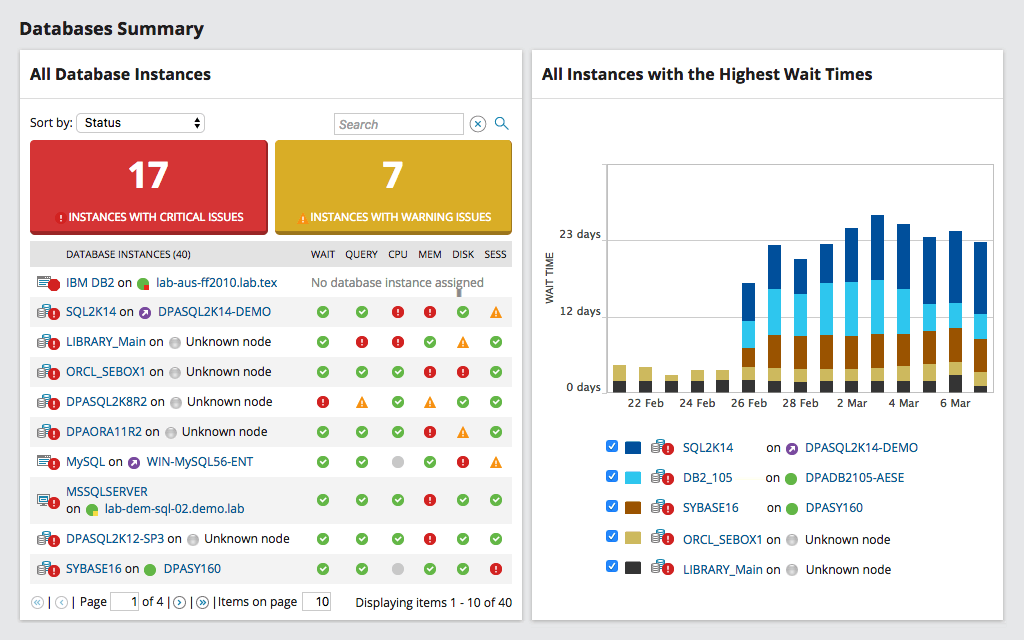
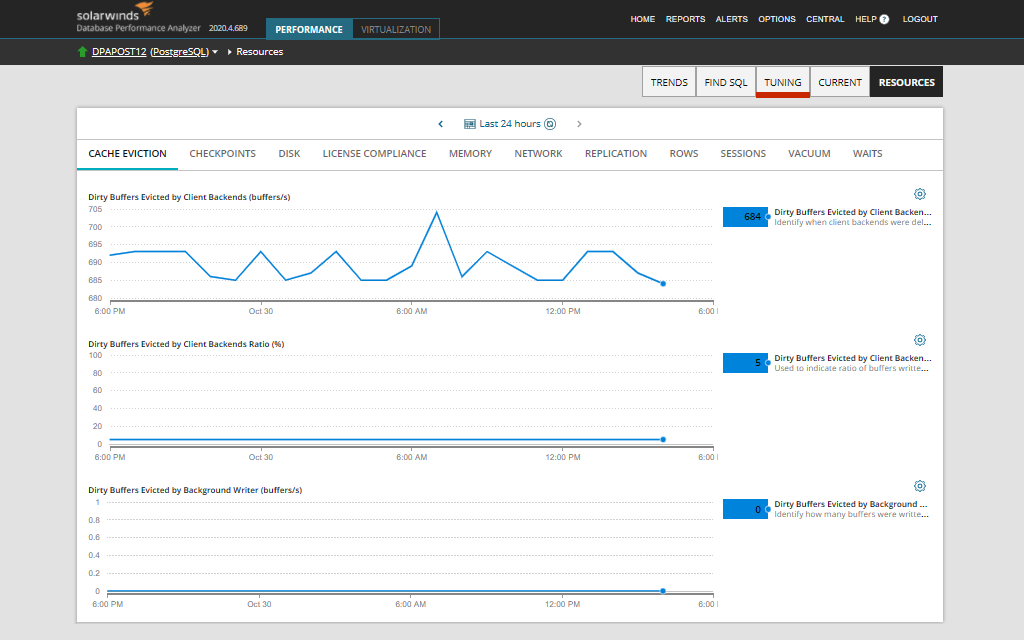
DPA collects data every second and automatically condenses it, so you can view and monitor your database’s health in real time on a 24/7 basis. You can track metrics over time to identify trends and even configure alerts for specific metrics, which will enable you to take action quickly whenever you encounter performance problems. Configuring automatic alerts with DPA is quick thanks to the drag-and-drop customizable email templates.
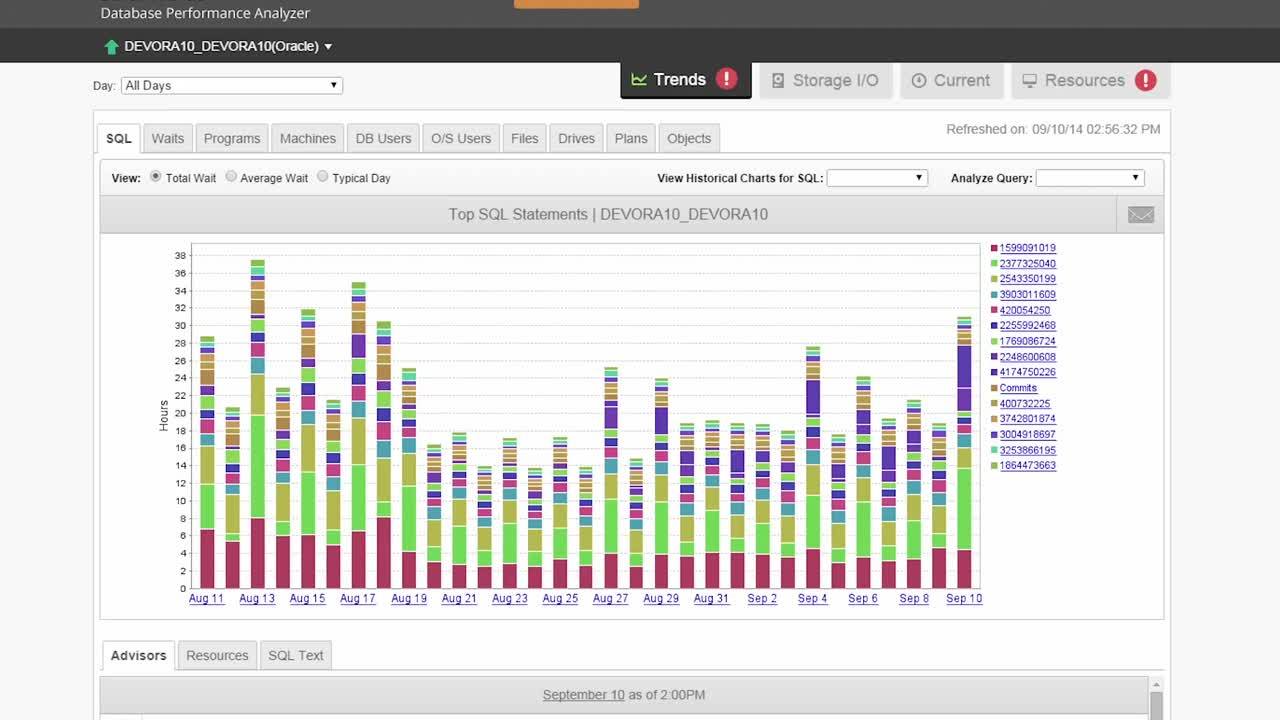
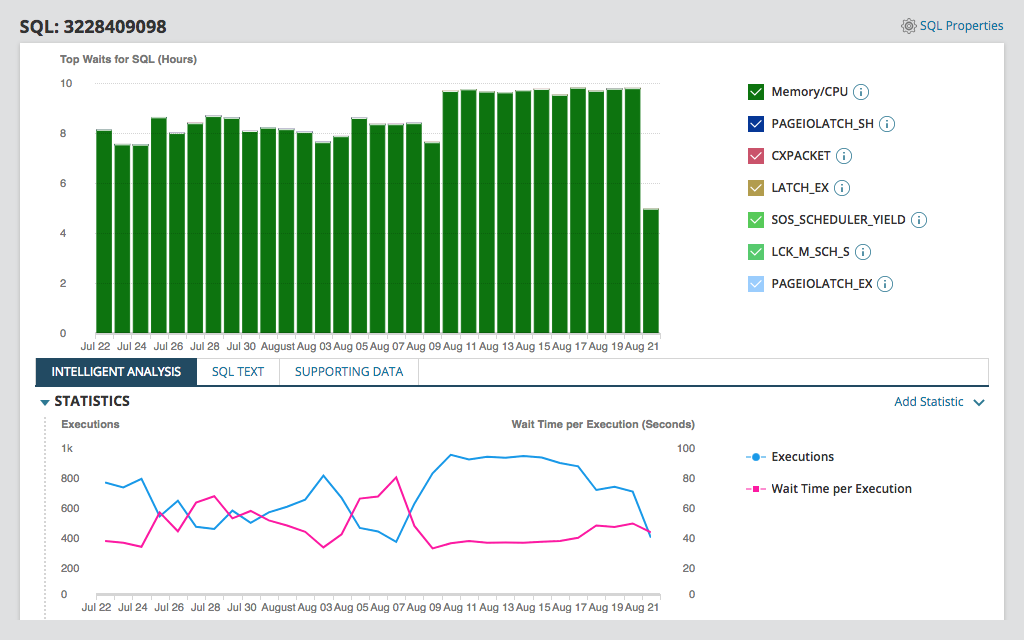
In just three or four clicks, you can drill down to identify the root causes of bottlenecks and other problems, so you can quickly resolve any performance issues. If you click on a bar, you can view details about your query, including its text, wait time, total wait time for your specified time period, SQL hash, and percentage of total wait time, enabling you to identify which queries are underperforming and helping guide your optimization efforts more effectively.
Similarly, you can drill down to discover if your problem is IO-related by clicking on the storage IO link and clicking on bars to view detailed information about your read/write performance. Plus, since DPA doesn’t use AWR objects, you won’t need to purchase any Oracle Tuning Pack licenses.
To begin monitoring an Oracle database instance with DPA, you’ll first need to register it. However, there are two ways to do this. You can register the Oracle database instance and either create the monitoring user yourself or let DPA create the monitoring user.
If you opt to create the monitoring user yourself, you’ll need to copy a script to a file. Then, you'll need to edit the script to include new username and password values before connecting to the Oracle database as a user using the SYSDBA role and running the script. The first script is performance optimized and creates objects under the SYS schema, while the second won’t and is a reduced-permission option.
You can then complete the registration wizard by clicking on Register DB Instance for Monitoring, Oracle, and I will create the monitoring user manually. After clicking Next, you’ll be able to select your connection method and specify instance options.
If you allow DPA to create the monitoring user, you will need to provide a privileged user’s credentials before completing the registration wizard. Instead of clicking I will create the monitoring user manually, choose DPA will create/configure the monitoring user. Then, enter your connection information, create or specify which account DPA will use to collect information, install a utility package, and give execute permissions to the DPA monitoring user. Finally, choose which tablespace you want to store your monitored instance’s DPA performance data.
Other SolarWinds tools to help improve Oracle environment:
Related features:
Designed for enterprise grid computing and safe data storage and retrieval, Oracle Database is a top Relational Database Management System (RDBMS) for many organizations, and it’s important to take steps to manage and optimize its performance.
To improve your Oracle database’s performance, reduce operational costs, stay compliant with regulations, and reduce the risk of data breaches, you’ll need to engage in Oracle database management and SQL tuning. This involves carefully monitoring your Oracle database’s resource consumption and consistently collecting performance metrics to establish baselines. You can then identify the root causes of bottlenecks and make changes to reduce wait time or improve throughput to ensure your application’s end-users have a positive experience.
Another essential part of Oracle database management is prioritizing the right SQL statements. After all, two SQL statements will take the same amount of time and effort to optimize, but one might have a negligible impact on database performance while the other might drastically improve performance. A simple way to discover which queries are inefficient and spend the most time in the database is by monitoring wait time and resource consumption. Once you’ve pinpointed which SQL statements are having the largest impact on Oracle database performance, you can concentrate your efforts in a more meaningful way and avoid wasting time optimizing SQL statements that have little-to-no effect on performance.
For more information, please click here.
Managing your database is critical if you’re using a data center of an Oracle cloud infrastructure. If you neglect to monitor and manage your Oracle database, you or your application’s users may experience slow, subpar performance, or even outages. On the other hand, taking the time to properly monitor the database and make adjustments accordingly will result in noticeable performance improvements. When you properly manage the database, you’ll be able to more easily locate and eliminate performance bottlenecks, reduce operating costs, and improve application performance for end-users.
When database monitoring, you’ll want to pay attention to:
SolarWinds® Database Performance Analyzer (DPA) was designed to make monitoring, analyzing, and managing Oracle database performance easy for database administrators, application developers, and IT managers. Whether your databases or applications are in the cloud or on-premises, DPA can help you save money, free up resources, and reduce response time.
DPA collects data every second and automatically condenses it, so you can view and monitor your database’s health in real time on a 24/7 basis. You can track metrics over time to identify trends and even configure alerts for specific metrics, which will enable you to take action quickly whenever you encounter performance problems. Configuring automatic alerts with DPA is quick thanks to the drag-and-drop customizable email templates.
In just three or four clicks, you can drill down to identify the root causes of bottlenecks and other problems, so you can quickly resolve any performance issues. If you click on a bar, you can view details about your query, including its text, wait time, total wait time for your specified time period, SQL hash, and percentage of total wait time, enabling you to identify which queries are underperforming and helping guide your optimization efforts more effectively.
Similarly, you can drill down to discover if your problem is IO-related by clicking on the storage IO link and clicking on bars to view detailed information about your read/write performance. Plus, since DPA doesn’t use AWR objects, you won’t need to purchase any Oracle Tuning Pack licenses.
To begin monitoring an Oracle database instance with DPA, you’ll first need to register it. However, there are two ways to do this. You can register the Oracle database instance and either create the monitoring user yourself or let DPA create the monitoring user.
If you opt to create the monitoring user yourself, you’ll need to copy a script to a file. Then, you'll need to edit the script to include new username and password values before connecting to the Oracle database as a user using the SYSDBA role and running the script. The first script is performance optimized and creates objects under the SYS schema, while the second won’t and is a reduced-permission option.
You can then complete the registration wizard by clicking on Register DB Instance for Monitoring, Oracle, and I will create the monitoring user manually. After clicking Next, you’ll be able to select your connection method and specify instance options.
If you allow DPA to create the monitoring user, you will need to provide a privileged user’s credentials before completing the registration wizard. Instead of clicking I will create the monitoring user manually, choose DPA will create/configure the monitoring user. Then, enter your connection information, create or specify which account DPA will use to collect information, install a utility package, and give execute permissions to the DPA monitoring user. Finally, choose which tablespace you want to store your monitored instance’s DPA performance data.
Other SolarWinds tools to help improve Oracle environment:
Related features:
Database Performance Analyzer for Oracle
Quickly gain viewable insights into issues.
Make confident tuning decisions for improved performance.
Share database maintenance visibility across users.