- Events
-
Partners
- Government
- Customer Portal
- Contact Us
- Contact Sales
-
English
Virtual machine monitoring, or VM monitoring, refers to the process of monitoring virtualized instances across your network. VM monitoring involves using software to monitor and manage these virtual machines, typically by examining the logs they continuously generate.
Shifting network responsibilities onto virtual machines running from the same physical host introduces a new set of concerns and issues unique to the nonphysical environment, including the different allocations of software and hardware required for the virtual machines to function properly. For virtual computing to be effective, machines also have to perform with the same reliability and speed as their physical counterparts. Failures in a virtual infrastructure can cause performance and efficiency losses, and can become costly to fix and address if not properly managed. Virtual machine monitoring tools offer admins a streamlined way to stay on top of the health of their virtual environments through a centralized dashboard.
VM monitoring tools function by tracking certain critical metrics indicative of the performance and health of your virtual devices to ensure they’re running efficiently. Much of this tracking is performed by software automatically collecting and analyzing the many event logs produced by virtual machines.
Using VM monitoring tools to track the health and performance of your virtual machines and physical host is essential to ensuring systems operate at peak efficiency and your network infrastructure can properly support your business’s operations. The virtual machines each host runs are collectively limited in terms of performance by the host’s technical specifications, and by monitoring the health of your devices, you can better avoid unwanted system downtime, ensuring any technical issues in your day-to-day operations won’t affect your business’s bottom line.
The advantages offered by virtual machines—namely running multiple desktops or servers from the same physical device—means the health of each physical device becomes more important. Since each physical host is likely responsible for multiple systems, if it should experience problems and need to go offline, each of its virtual machines will have to go offline as well. Using VM monitoring software allows you to track the health of your devices to avoid, to the best of your ability, problems requiring system downtime.
VM monitoring software allows you to track and manage the performance of your virtual servers and desktops from one application or interface. Compiling all the log data collected from the various machines and synthesizing it into digestible patterns and trends can allow you to make more informed decisions with regard to your network and virtual machines.
For example, memory ballooning is the process through which a hypervisor “reclaims” unused memory from virtual machines the physical host can reallocate to overtaxed virtual machines. While this process can lead to more efficient use of physical memory, it can also slow the performance of virtual machines. Idle virtual machines are another metric to track with VM monitoring. Sometimes called “zombie” machines, these virtual devices continue to run after they’re no longer in use, creating unnecessary drains on your CPU, memory, and storage. Too many idle or orphaned virtual machines can also affect the performance of active machines, and, if left unchecked, can lead to VM sprawl.
Another metric VM monitoring software tracks is hardware health, because if a processor or a fan stops working, a physical host can go down and take all the virtual machines with it.
Having a VM monitoring tool to provide historical and real-time insights can help users better understand the overall performance, stability, and efficient allocation of resources.
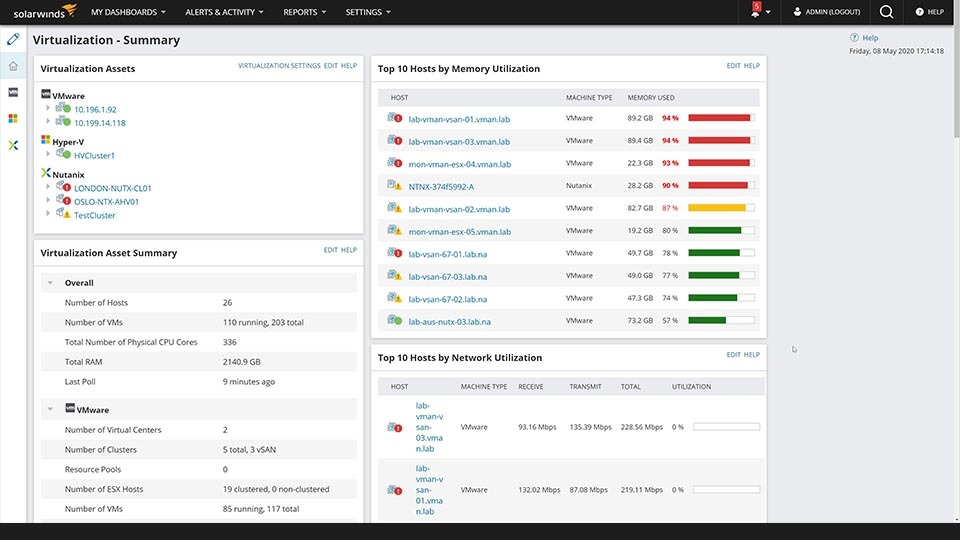
SolarWinds Virtualization Manager is designed to be a comprehensive VM monitoring software application with a number of powerful tools to give you greater control over and insight into your virtual machines. Intuitive dashboards and an extensive, customizable alerting system helps ensure you’re informed of all critical activity and events across your various virtual devices. Virtualization Manager is built to give you broad visibility and granular details, regardless of whether your systems are on-premises or cloud based, across VMware, AHV, and Hyper-V systems—all from the same dashboard.
The console in Virtualization Manager also allows you to perform various management and monitoring functions without switching between different tools for easier troubleshooting, so you can resolve any potential virtualization issues quickly and efficiently. Certain management functions can be customized so they are activated by alert contingencies or scripts, giving you the ability to tailor nearly every aspect of your management functions to suit your needs and resources.
In addition to collecting information about various metrics, Virtualization Manager also automatically performs optimization analyses on your systems and their performance to identify ways to make your usage of processing power and storage more efficient. Other tools in SolarWinds VMAN specifically target controlling VM sprawl, which can help improve the overall performance of your virtual machines.
Other SolarWinds features and tools to help manage and monitor databases:
Virtual machine monitoring, or VM monitoring, refers to the process of monitoring virtualized instances across your network. VM monitoring involves using software to monitor and manage these virtual machines, typically by examining the logs they continuously generate.
Shifting network responsibilities onto virtual machines running from the same physical host introduces a new set of concerns and issues unique to the nonphysical environment, including the different allocations of software and hardware required for the virtual machines to function properly. For virtual computing to be effective, machines also have to perform with the same reliability and speed as their physical counterparts. Failures in a virtual infrastructure can cause performance and efficiency losses, and can become costly to fix and address if not properly managed. Virtual machine monitoring tools offer admins a streamlined way to stay on top of the health of their virtual environments through a centralized dashboard.
VM monitoring tools function by tracking certain critical metrics indicative of the performance and health of your virtual devices to ensure they’re running efficiently. Much of this tracking is performed by software automatically collecting and analyzing the many event logs produced by virtual machines.
Using VM monitoring tools to track the health and performance of your virtual machines and physical host is essential to ensuring systems operate at peak efficiency and your network infrastructure can properly support your business’s operations. The virtual machines each host runs are collectively limited in terms of performance by the host’s technical specifications, and by monitoring the health of your devices, you can better avoid unwanted system downtime, ensuring any technical issues in your day-to-day operations won’t affect your business’s bottom line.
The advantages offered by virtual machines—namely running multiple desktops or servers from the same physical device—means the health of each physical device becomes more important. Since each physical host is likely responsible for multiple systems, if it should experience problems and need to go offline, each of its virtual machines will have to go offline as well. Using VM monitoring software allows you to track the health of your devices to avoid, to the best of your ability, problems requiring system downtime.
VM monitoring software allows you to track and manage the performance of your virtual servers and desktops from one application or interface. Compiling all the log data collected from the various machines and synthesizing it into digestible patterns and trends can allow you to make more informed decisions with regard to your network and virtual machines.
For example, memory ballooning is the process through which a hypervisor “reclaims” unused memory from virtual machines the physical host can reallocate to overtaxed virtual machines. While this process can lead to more efficient use of physical memory, it can also slow the performance of virtual machines. Idle virtual machines are another metric to track with VM monitoring. Sometimes called “zombie” machines, these virtual devices continue to run after they’re no longer in use, creating unnecessary drains on your CPU, memory, and storage. Too many idle or orphaned virtual machines can also affect the performance of active machines, and, if left unchecked, can lead to VM sprawl.
Another metric VM monitoring software tracks is hardware health, because if a processor or a fan stops working, a physical host can go down and take all the virtual machines with it.
Having a VM monitoring tool to provide historical and real-time insights can help users better understand the overall performance, stability, and efficient allocation of resources.
SolarWinds Virtualization Manager is designed to be a comprehensive VM monitoring software application with a number of powerful tools to give you greater control over and insight into your virtual machines. Intuitive dashboards and an extensive, customizable alerting system helps ensure you’re informed of all critical activity and events across your various virtual devices. Virtualization Manager is built to give you broad visibility and granular details, regardless of whether your systems are on-premises or cloud based, across VMware, AHV, and Hyper-V systems—all from the same dashboard.
The console in Virtualization Manager also allows you to perform various management and monitoring functions without switching between different tools for easier troubleshooting, so you can resolve any potential virtualization issues quickly and efficiently. Certain management functions can be customized so they are activated by alert contingencies or scripts, giving you the ability to tailor nearly every aspect of your management functions to suit your needs and resources.
In addition to collecting information about various metrics, Virtualization Manager also automatically performs optimization analyses on your systems and their performance to identify ways to make your usage of processing power and storage more efficient. Other tools in SolarWinds VMAN specifically target controlling VM sprawl, which can help improve the overall performance of your virtual machines.
Other SolarWinds features and tools to help manage and monitor databases:
Virtualization Manager
Leverage comprehensive insights for informed VM decision making
Ensure your resources are allocated for greatest efficiency
Apply fixes to your virtual machines with one-click remediation tools