- Events
-
Partners
- Government
- Customer Portal
- Contact Us
- Contact Sales
-
English
AHV monitoring is the process of tracking metrics across your Nutanix products to ensure optimal performance. The process of monitoring Nutanix can be complex, as it can require you to pay attention not only to storage capacity limitations but also the interactions between applications and hardware.
AHV includes every part of your environment—the hypervisor and its hosts, the virtual machine file system (where storage is tracked), and more. The most effective monitoring of your AHV environment can require tracking storage capacity issues, identifying bottlenecks, and optimizing performance.
AHV monitoring works by tracking metrics on the managed nodes across your virtual environment. While it’s possible to gather some information manually, using software can help automate the process. An AHV monitoring tool can use the Nutanix API or SNMP protocol to continually gather critical information about virtual clusters, volumes, CPU, memory, network traffic utilization, and other important components.
AHV monitoring tools can also offer alerts and recommendations when issues are detected. To achieve effective AHV monitoring, you might also use features like topology analytics, notifications, and reporting to help detect and remedy application issues within your virtual infrastructure.
While agentless monitoring puts a lighter load on your system, for VMs or cloud instances that don’t permit agentless monitoring, enterprise-grade AHV monitoring software such as SolarWinds VMAN is built to provide more comprehensive monitoring by supporting your ability to create and deploy custom scripts for PowerShell, Linux/Unix, Windows, and Nagios.
AHV monitoring can be critical to helping ensure the smooth functioning of Nutanix instances. A major component of AHV client monitoring is keeping track of data consumption and capacity for the different VMs. If there’s a disk with insufficient capacity to run your VM, or if packets are being transferred to a VM with excessive frequency, bottlenecks can occur and disrupt the functionality of your entire virtual environment.
AHV monitoring is also important to help ensure your hypervisors run smoothly. The hypervisor is the central component of any Nutanix operation since it operates like a barrier between the different VMs in your system. If hosts are operating above capacity, or if they’re subject to hardware malfunction, the whole Nutanix operation can be put in jeopardy. AHV monitoring tools are designed to protect and provide insights into your Nutanix operations for capacity issues, bottlenecks, and hardware malfunctions.
Ensuring efficient data usage is also at the core of AHV monitoring software. Nutanix AHV monitoring software can provide important performance insights to help protect you from operational issues. To operate efficiently, various data storage and transfer processes must be kept in check to ensure VMs aren’t slowing down due to data-related problems. AHV monitoring software can observe I/O metrics to make sure data transfer is streamlined and keep track of data storage components like memory usage, CPU storage capacity, disk storage capacity, cloud storage, and other areas that might lead to clutter or shutdown.
When inefficiencies affect the performance of Nutanix installations, you can lose a great deal of operability in the process. AHV monitoring is software built to save time and energy and can help save organizations money.
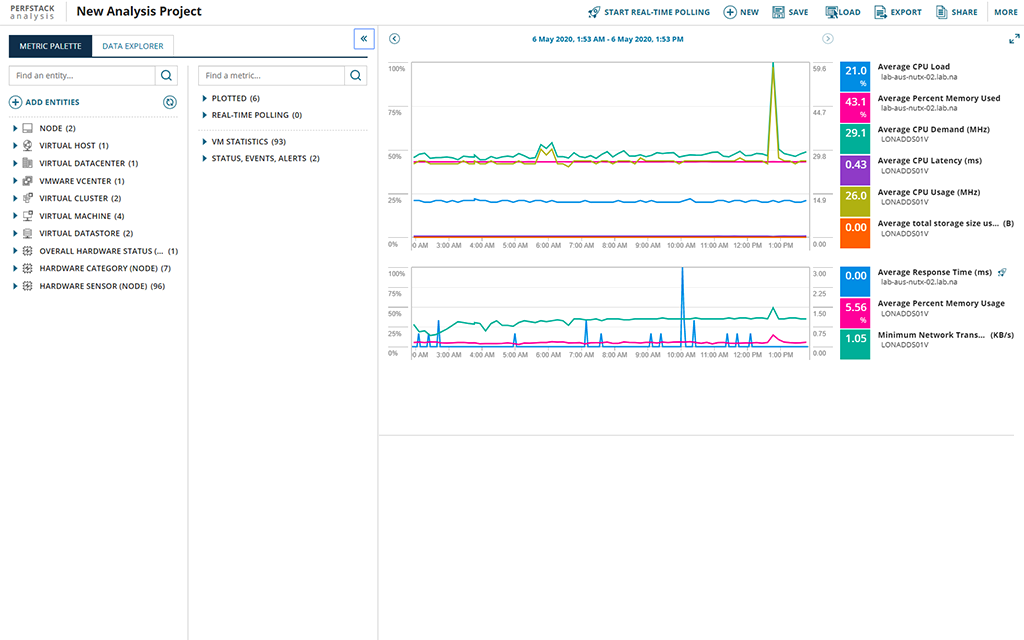
SolarWinds VMAN combines state-of-the-art alert messaging tools with in-depth diagnostics and visualized monitoring to help you optimize VM performance, so you get the most efficient AHV setup possible. AHV monitoring in SolarWinds VMAN monitors data transfer and storage issues, including I/O performance, disk drives, and storage devices. Nutanix bundled registration - rather than individually registering the VM's, can be done in one bulk operation.
Users can now register multiple clusters at once using the Prism Central identity and not have to spend time registering them one by one.
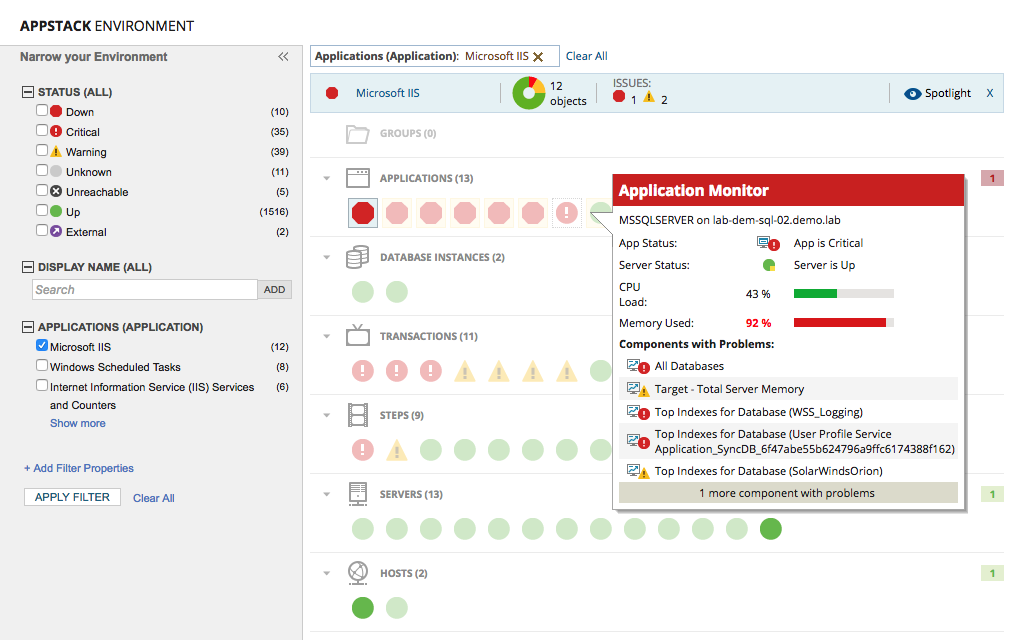
VMAN is designed to provide complete visibility across your virtualization infrastructure and maximize VM efficiency to help improve overall performance. Its built-in alert system is designed to uncover and resolve issues unique to AHV.
AHV monitoring is the process of tracking metrics across your Nutanix products to ensure optimal performance. The process of monitoring Nutanix can be complex, as it can require you to pay attention not only to storage capacity limitations but also the interactions between applications and hardware.
AHV includes every part of your environment—the hypervisor and its hosts, the virtual machine file system (where storage is tracked), and more. The most effective monitoring of your AHV environment can require tracking storage capacity issues, identifying bottlenecks, and optimizing performance.
AHV monitoring works by tracking metrics on the managed nodes across your virtual environment. While it’s possible to gather some information manually, using software can help automate the process. An AHV monitoring tool can use the Nutanix API or SNMP protocol to continually gather critical information about virtual clusters, volumes, CPU, memory, network traffic utilization, and other important components.
AHV monitoring tools can also offer alerts and recommendations when issues are detected. To achieve effective AHV monitoring, you might also use features like topology analytics, notifications, and reporting to help detect and remedy application issues within your virtual infrastructure.
While agentless monitoring puts a lighter load on your system, for VMs or cloud instances that don’t permit agentless monitoring, enterprise-grade AHV monitoring software such as SolarWinds VMAN is built to provide more comprehensive monitoring by supporting your ability to create and deploy custom scripts for PowerShell, Linux/Unix, Windows, and Nagios.
AHV monitoring can be critical to helping ensure the smooth functioning of Nutanix instances. A major component of AHV client monitoring is keeping track of data consumption and capacity for the different VMs. If there’s a disk with insufficient capacity to run your VM, or if packets are being transferred to a VM with excessive frequency, bottlenecks can occur and disrupt the functionality of your entire virtual environment.
AHV monitoring is also important to help ensure your hypervisors run smoothly. The hypervisor is the central component of any Nutanix operation since it operates like a barrier between the different VMs in your system. If hosts are operating above capacity, or if they’re subject to hardware malfunction, the whole Nutanix operation can be put in jeopardy. AHV monitoring tools are designed to protect and provide insights into your Nutanix operations for capacity issues, bottlenecks, and hardware malfunctions.
Ensuring efficient data usage is also at the core of AHV monitoring software. Nutanix AHV monitoring software can provide important performance insights to help protect you from operational issues. To operate efficiently, various data storage and transfer processes must be kept in check to ensure VMs aren’t slowing down due to data-related problems. AHV monitoring software can observe I/O metrics to make sure data transfer is streamlined and keep track of data storage components like memory usage, CPU storage capacity, disk storage capacity, cloud storage, and other areas that might lead to clutter or shutdown.
When inefficiencies affect the performance of Nutanix installations, you can lose a great deal of operability in the process. AHV monitoring is software built to save time and energy and can help save organizations money.
SolarWinds VMAN combines state-of-the-art alert messaging tools with in-depth diagnostics and visualized monitoring to help you optimize VM performance, so you get the most efficient AHV setup possible. AHV monitoring in SolarWinds VMAN monitors data transfer and storage issues, including I/O performance, disk drives, and storage devices. Nutanix bundled registration - rather than individually registering the VM's, can be done in one bulk operation.
Users can now register multiple clusters at once using the Prism Central identity and not have to spend time registering them one by one.
VMAN is designed to provide complete visibility across your virtualization infrastructure and maximize VM efficiency to help improve overall performance. Its built-in alert system is designed to uncover and resolve issues unique to AHV.
Virtualization Manager
Monitor AHV client issues with a customizable dashboard.
Get alerts when your virtual environment is hampered by bottlenecks and hardware issues.
Identify performance issues before they take a toll on your VMs.