- Events
-
Partners
- Government
- Customer Portal
- Contact Us
- Contact Sales
-
English
In any Hyper-V or VMware environment, it’s essential to maintain the approved configuration standards. Even a slight deviation in a virtual server configuration can have a negative impact on VM performance. Also, it can be difficult to continuously track every virtualization configuration change.
SolarWinds Virtualization Manager is built with a Virtual DNA feature designed to hold historical records, which allows you to compare VM configuration changes over time. This makes it easier for you to see how VM configurations have changed as a result of day-to-day operations, putting you in a better position to troubleshoot and proactively respond to issues.
Making VM configuration changes in a virtual environment can result in performance issues—but what config change was it? Without VM configuration management capabilities, troubleshooting problems can take a lot of time and energy.
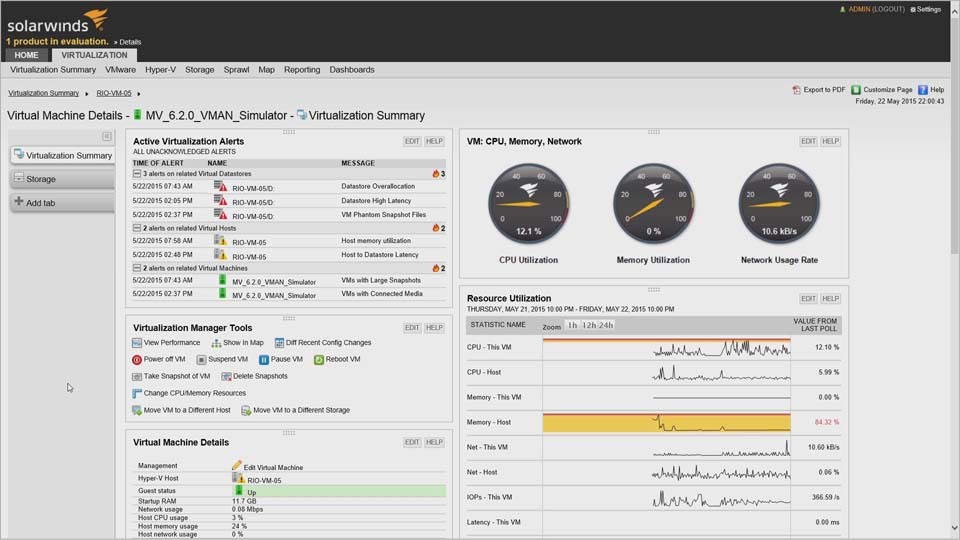
SolarWinds Virtualization Manager comes equipped with built-in configuration management tools designed to significantly reduce your troubleshooting time by automatically tracking performance issues caused by configuration changes. Its intuitive dashboards and customizable alert system can also allow you to drill down on VM performance issues in greater detail and in real-time.
Virtual machine configuration refers to how VM resources are arranged and deployed, allowing them to operate effectively. VM configuration involves changing or otherwise customizing the default settings in a virtual machine.
Many IT professionals prefer virtual machines because they’re very quick and easy to spin up, but the default configuration settings might not be sufficient to optimize VM performance. VM configuration is important because VMs, like any other computer operating system, can be configured to the needs of a user or group of users. Each virtual machine needs to be configured within the confines of its resources, which is why being mindful of your system’s capability and limits is part of VM configuration best practices. If you configure your VM to only use the resources it needs, overall functioning will improve. Proper VM configuration can also help you maximize VM operational efficiency.
Using VM configuration tools to manage multiple VM systems can help automate the most time-consuming and labor-intensive processes involved in tracking virtualization config changes. These tools are built to help IT administrators apply changes across multiple hosts and monitor the effect of the changes moving forward.
Untracked and unaccounted for configuration changes are common causes of inefficient VM performance. Misconfigured virtualization changes can also lead to poor VM performance and uncontrolled VM resource growth as well, which in turn can cause VM sprawl. If these VM configuration changes aren’t properly correlated, it can take longer to troubleshoot and isolate performance problems. VM configuration tools are designed to provide complete visibility into your virtual machine systems environment, so you can see how configuration changes are affecting applications and servers on your network.
SolarWinds Virtualization Manager works by helping you identify VM performance issues stemming from VM configuration management and configuration changes. Its integrated virtualization configuration management capabilities allow you to accurately track configuration changes across your system. The Virtual DNA feature creates an archive of past performance data and configuration files from which you can cross-reference VM configuration changes past and present. This function can also help you see how configuration changes have affected day-to-day operations, and this data can be used to make more informed configuration decisions in the future.
Virtualization Manager’s built-in VM configuration management tools are designed to help cut your troubleshooting time in half by automatically monitoring configuration-based performance issues. You can also isolate virtual server and machine issues with custom alerts, virtualization stacks, intuitive dashboards, and VMware performance monitoring capabilities to help speed up and improve the troubleshooting process.
Virtual machine configuration refers to how VM resources are arranged and deployed, allowing them to operate effectively. VM configuration involves changing or otherwise customizing the default settings in a virtual machine.
Many IT professionals prefer virtual machines because they’re very quick and easy to spin up, but the default configuration settings might not be sufficient to optimize VM performance. VM configuration is important because VMs, like any other computer operating system, can be configured to the needs of a user or group of users. Each virtual machine needs to be configured within the confines of its resources, which is why being mindful of your system’s capability and limits is part of VM configuration best practices. If you configure your VM to only use the resources it needs, overall functioning will improve. Proper VM configuration can also help you maximize VM operational efficiency.
Using VM configuration tools to manage multiple VM systems can help automate the most time-consuming and labor-intensive processes involved in tracking virtualization config changes. These tools are built to help IT administrators apply changes across multiple hosts and monitor the effect of the changes moving forward.
Untracked and unaccounted for configuration changes are common causes of inefficient VM performance. Misconfigured virtualization changes can also lead to poor VM performance and uncontrolled VM resource growth as well, which in turn can cause VM sprawl. If these VM configuration changes aren’t properly correlated, it can take longer to troubleshoot and isolate performance problems. VM configuration tools are designed to provide complete visibility into your virtual machine systems environment, so you can see how configuration changes are affecting applications and servers on your network.
Virtualization Manager
Resolve VM performance issues caused by VM configuration changes with a single click
Use high-quality, custom recommendations for optimal VM size and placement
Reclaim resources back into the virtual pool to optimize VM configuration management