- Events
-
Partners
- Government
- Customer Portal
- Contact Us
- Contact Sales
-
English
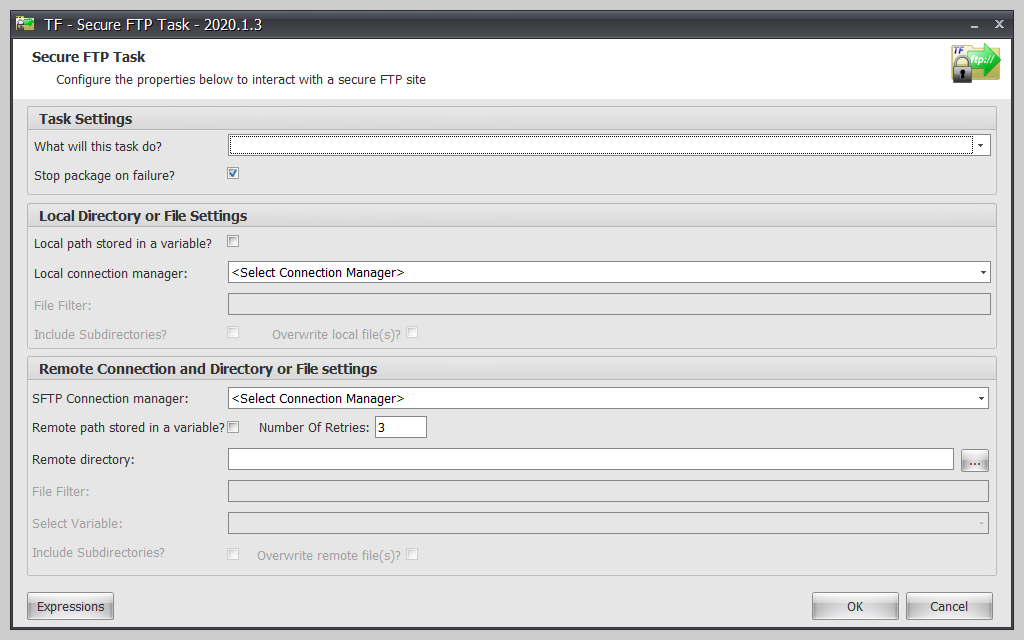
Brings encrypted security to FTP within SSIS. Task Factory Secure FTP Task allows you to transmit files over most common secure channels to your partners safely in an easy-to-use user interface.
Supports:
SSIS Email Source Adapter reads email from a mailbox into a data flow with the ability to filter messages based on sender, message to, subject, date received, body, and priority.
Supports IMAP/POP3 and most email providers, including Gmail.
Acts as a gatekeeper for your data. Many companies receive questionable data from various sources, causing a myriad of production problems and inconsistent reporting. Data Validation Transform is an SSIS component designed to verify your data is clean prior to insertion. Suspicious rows are flagged for later removal or additional business rules.
Additional features of Data Validation Transform:
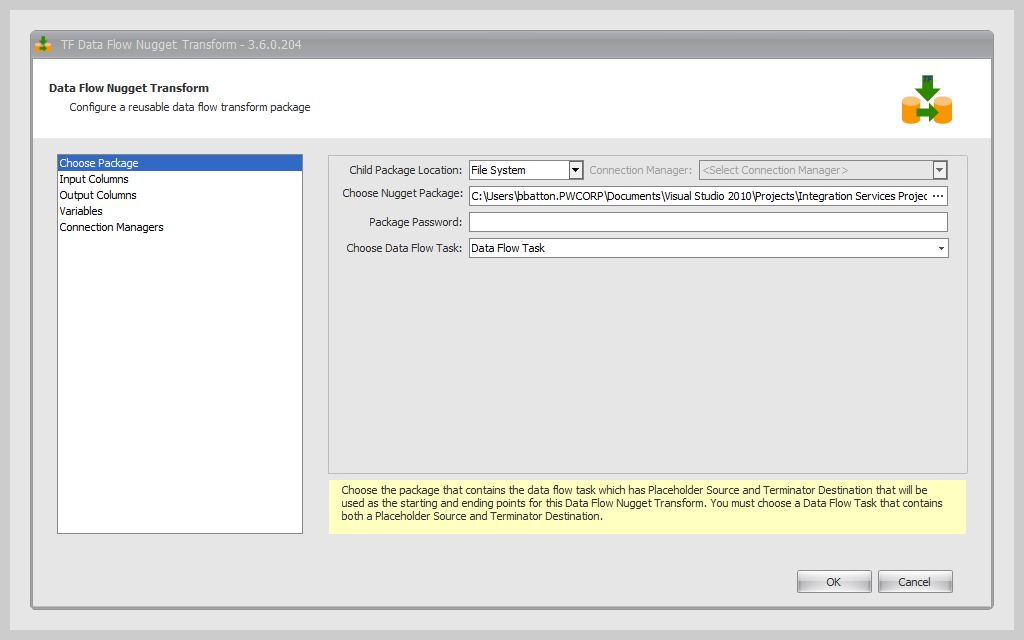
The Data Flow Nugget Transform brings the ability to set up a single package with business or data rules you can reuse across several packages. When using the Data Flow Nugget Transform, you can change the business rules one time instead of changing the rules in every SSIS package that use the same rules.
The Data Flow Nugget Transform component allows you to easily use saved data flow nuggets across multiple SSIS packages to reduce development time.
Learn More About SSIS Components in Task Factory
Download File Task provides a way for you to download files over HTTP from within SSIS without the use of FTP. This component has an easy-to-use UI to help you download files over HTTP in minutes.
Error Output Description Transform is an SSIS component that allows the user to connect error outputs to it from sources and transforms to get detailed information on why the row failed. Normally, the user can’t see what data caused a failure. However, with the error output description, the user can see the exact error and the row data that caused the error.
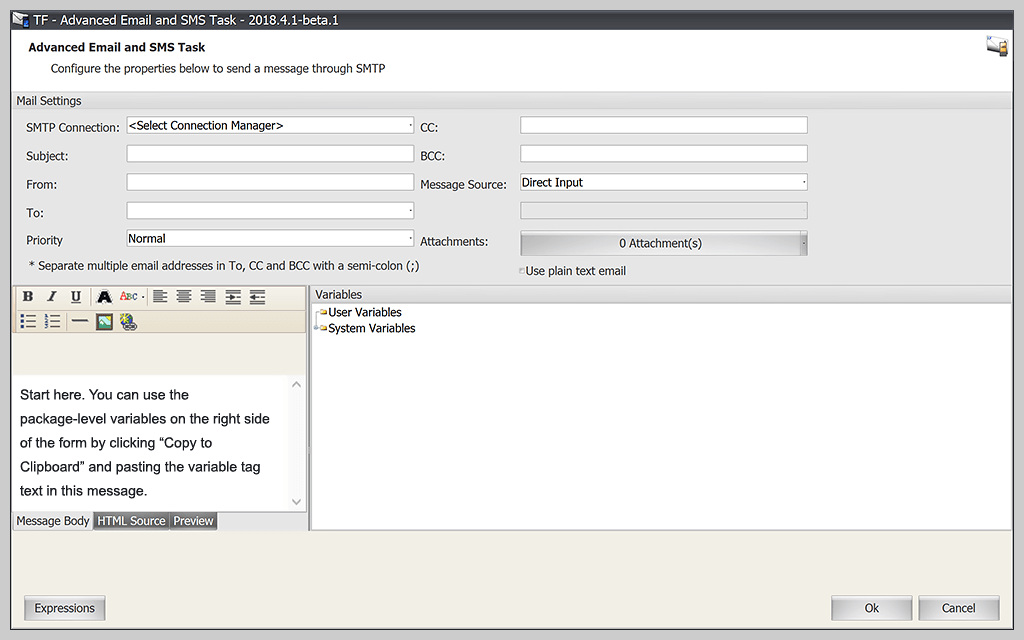
Advanced Email and SMS Task sends emails from within an SSIS package through SMTP. It allows the use of User/System Variables as placeholders in the email body, so variables can be automatically replaced when an email is sent. This component has a built-in HTML editor for HTML email and supports sending SMS messages.
Hash Transform is an SSIS component where users can choose from a selection of algorithms to easily create hash values from input columns. Other features include customizing the order of input, the option to enable padding, adding null replacement character(s), and defining separator character(s). This creates a combined value across multiple columns and makes it easier to find changes in a source or destination set of columns.
Advanced Execute Package Task provides a way for you to execute a child package from your SSIS package as well as passing and retrieving variables to and from the child package. It can be used with password protected packages.
The component also allows for variables to be mapped from the parent package to be used in the child package and for the reading of variables from child packages to be used in your SSIS package.
This component reads the properties, such as File Exists, File Size, File Name, File Content, Creation Time, Is File In Use, Hidden, and Read-only, then assigns them to SSIS package level variables.
Many companies receive large data files from outside their organizations and run the risk of loading the file prematurely during transmission causing an SSIS failure. File Properties Task gives you the power to eliminate this problem by determining if the file is in use or transmitted before loading. File Properties Task additionally saves drive space by identifying old files ready for archive.
Time Zone Conversion Transform is an SSIS component designed to convert the value of a target column from one time zone to another and place it into a new column. Time Zone Conversion Transform will allow users to convert dates from one time zone to another using the TZ database from the IANA Organization within just a few minutes.
Data Cleansing Transform is an SSIS component with 16 built-in algorithms that allow you to clean data without programming or SQL updates. This feature is used to cleanse data from a source by applying cleansing rules to the data.
Unpack Data Transform allows users to take packed/stuffed XML or delimited text data from a source column and split the data into individual rows and columns in SSIS. You can then parse it out into separate user-defined columns. The parsed rows of data will be sent out of a separate output, with the source input data being sent out of the main output untouched. Unpack Data Transform makes it easy to extract data out of columns in SSIS.
This component saves you from having to write a script component to parse delimited text data or XML data into a separate output. The time savings can reach up to 50 hours depending on the data. Additionally, you can preview what your data will look like.
XML Destination is an SSIS component that allows the user to export source data to an XML file. The name of the column can be customized to output any name needed instead of the column name from the source. The column data can be exported as an attribute, element, element with CDATA, or element with XML Data.
With the XML Destination component, Null data can be handled by exporting an empty xml element/attribute, ignoring the attribute/element, or replacing the Null data with a custom value. Additionally, the order in which the column data is exported can be fully customized. A preview of the file to be exported can be viewed for correctness in the user interface.
Formatting options:
XML Output Destination is an SSIS component created for writing XML files that use large datasets. After pointing to an XSD file, users can establish parent-child relationships between elements, choose between Unicode and UTF8 encoding, and select whether the component outputs “Pretty” formatting (indentations and line breaks).
Advanced Derived Column extends and replaces the native SSIS Derived Column to allow the user to use our expanded Expression Engine and its 180+ functions to create new columns in your dataflow. The Expression Engine supports multi-line expression, which allows for more complex conditions to be created. The Extended Expression Library also allows the user to create new conditions based on expressions not available in SSIS.
The Unit Tester that comes with the Expression Editor allows the user to test the condition expression before running the package. Expression Reusability allows the user to define an expression and reuse it in other derived conditions.
Compresses or decompresses a file or directory within SSIS. Many companies struggle with transmitting files larger than 1 GB. Compression Task will compress files within SSIS by up to 90%, allowing greater speed and less network space in an easy to use user interface.
Compression Task supports:
Address Parse Transform is an SSIS component containing data elements including AddressLine1, AddressLine2, City, State, PostalCode, StreetNumber, StreetDirection, and more. This component is used to parse unformatted address data into USPS standardized address data, while granular detailed data available about each address is parsed for use in the data flow.
Surrogate Key Transform is an SSIS component that adds an identifier column to a data flow used to uniquely identify a row. This is useful if your data source doesn’t contain an identifier or you simply want to add a row counter to your data flow. It also allows the use of variables to determine seed and increment.
Replace Unwanted Characters Transform gives the user two options to remove unwanted characters or words from source data. The replaced data can be outputted to the same column in the transform or a new output column.
PGP Encryption Task brings easy-to-use PGP encryption, decryption, file signing, and verification to SSIS based on OpenPGP technology.
The component also allows for variables to be mapped from the parent package to be used in the child package and for the reading of variables from child packages to be used in your SSIS package.
Task PGP Task features:
Timer Task is an SSIS component that can be used to add absolute or relative delay (up to days, hours, minutes, or seconds) during your execution anywhere in the package.
Filter Rows Transform allows you to filter rows based on an SSIS expression. This is similar to a conditional split, but now only the rows matching the filter will be sent through to the downflow, and rows that don’t match are filtered out.
SSIS Expression features:
Our Advanced Aggregator Transform takes aggregation in SSIS to the next level. We extended the base functionality of aggregate functions to allow expression-based aggregation and added a few more aggregation functions (First, Last) into the equation. You can use something like SUM(Quantity, UnitPrice > 20), which will only sum the quantity if the price is greater than 20.
Trim Plus Transform is an SSIS component that provides a way for users to trim either whitespace or user defined characters from the beginning and end of source columns.
Whitespace trim actions will trim whitespace from column data by trimming all:
Specified character trim actions allows the user to define the character(s) to be trimmed from the source column data. You can trim specified characters from Start, End, and Start and End.
Terminator Destination is an SSIS component that allows you to quickly add a destination to your package without configuration. This is useful when developing your SSIS packages and you want to quickly add a destination without having to configure a flat file destination or any other destination that will eventually be detected. This component also easily tests package data flows without having to write data to a destination, giving you the ability to write rows to a file destination for auditing purposes.
Null Handler Transform is an SSIS component that allows the user to replace null or blank values from their source data with a user defined value (e.g. replace null with empty string or vice versa).
With the Null Handler Transform component, there are three actions available to handle null or blank values:
RegEx Replace Transform is an SSIS component that allows the user to define a regular expression to either replace (with user-defined value) or extract data from a source column. The replaced data can be outputted to the same column in the transform or a new output column.
Expression Task is an SSIS task that allows you to take full advantage of the 180+ functions in our Expression Engine to set variables and call standalone functions like CreateFile without any scripting. This component can support replacing placeholders with data created using an expression and can call functions to perform actions like creating folders, sending emails, and writing files with a single line of code.
File Gateway Task enables the user to validate a text file contains the expected information in the expected format prior to using it. This is beneficial for those who work with a lot of text files, particularly if those files come in from outside sources.
The File Gateway Source enables you to validate text files by separating valid and invalid rows into success and error output.
The Excel Source allows users to connect to an existing Excel file and extract its data. Using OpenXML, the Excel Source sends the rows into a data flow.
The Excel Destination allows users to connect to a new or existing Excel file and write data to it using OpenXML.
Task Factory
60+ high-performing SSIS components
Save time managing tedious data warehousing ETL tasks
Connect to dozens of data sources