- Events
-
Partners
- Government
- Customer Portal
- Contact Us
- Contact Sales
-
English
Companies of all sizes must make sure their network has enough bandwidth to handle business-critical operations. The Bandwidth Gauge tool in SolarWinds® Engineer’s Toolset™ (ETS) allows you to create custom bandwidth gauges and start collecting statistics right away. You can set the gauges to update at certain intervals, view data in a table format, and view historic bandwidth data in intuitive charts with the ability to set gauges for multiple interfaces.
Increased CPU load often means your network has too many demanding apps or you may have a virus on your hands. The CPU monitor included in the network monitoring toolset from ETS allows you to monitor CPU load for multiple devices in real time and represent the data in tabular form. The tool even allows you to set warning thresholds to alert you when your CPU load approaches critical levels. Using these capabilities can help ensure CPU usage doesn’t surpass peak levels or slow down performance.
In addition to measuring your network’s bandwidth, you must also know how your bandwidth is being used. Networking monitoring tools like the NetFlow Real-Time tool in ETS can show you different kinds of inbound and outbound network traffic to offer enhanced visibility into Cisco NetFlow data, which can help you break down traffic according to a variety of metrics around applications, endpoints, conversations, domains, and more. This tool can also speed up troubleshooting by pinpointing and helping you more quickly diagnose traffic spikes.
Latency is a measure of your network’s speed in milliseconds. When networks are stressed, latency increases, and requests take longer to be fulfilled, which causes dropped packets and performance issues.
Proxy Ping helps you determine latency between two sites or two SNMP-enabled devices, even if they’re remote. You can also execute ping tests on Cisco routers to drill down on latency issues and more easily mitigate their effects before they start impacting end users.
Bandwidth issues and network segment failures can occur anywhere in your network, and you can’t spend time searching during a slowdown.
Network monitoring tools with TraceRoute can help you diagnose response-time problems by automatically tracing network paths and highlighting any performance issues along that path in real-time. TraceRoute is designed to display domain names and response times for each hop plus machine type, ISO level, and boot time for each network path to help you troubleshoot quicker.
Network monitoring tools are tools to help admins streamline, automate, and optimize network monitoring best practices.
As more devices, endpoints, applications, and servers are added to account for rapidly changing business needs, network monitoring can become more complex and nearly impossible to do manually.
When end users report an error or performance issue, it’s important to find the problem as quickly as possible—but is the problem being caused by an application, too many users, an overall network issue, or something else entirely? How can you easily filter out the noise to pinpoint the true cause of a bottleneck?
To resolve issues quickly, you can use a range of network monitoring tools with pinpointed functions to troubleshoot more effectively. Network monitoring tools should be able to execute the following tasks to help you streamline and optimize your network monitoring best practices:
Network administrator monitoring tools are designed to offer admins the data and metrics necessary to help keep networks healthy.
Network monitoring refers to the practice of routinely checking a network for failures or performance issues, troubleshooting and solving these issues when they occur, and taking proactive measures to prevent problems in the future.
Networks are no longer flat with only a few elements you can manage manually—they’re complex systems with many interconnecting applications, routers, servers, firewalls, devices, and more. Network monitoring can help make sure everything within the network is functioning at its highest capacity.
Network monitoring should also include checking hardware health to make sure critical appliances stay online. Relevant metrics include CPU utilization, temperature, fan speed, and power supply.
Tracking availability is also important for comprehensive network monitoring, which includes observing the resources within a system to make sure they’re available to meet requirements and strive for 100% uptime. Some technologies designed to help with availability monitoring are Ping, SNMP, WMI, IPSLA, and Telnet.
Network monitoring is an extremely important but often complex task. Admins know you can’t monitor your network once a month or even once every two weeks—a network must be monitored constantly to keep it healthy, which is why manual network monitoring can be too time-consuming and labor-intensive to be effective.
Benefits of network monitoring include helping you:
Using network monitoring tools can help you more easily follow these network monitoring best practices.
Two of the most popular network monitoring tools from SolarWinds are Network Performance Monitor (NPM) and Engineer’s Toolset. Both tools are designed to help you meet your network monitoring needs, but which one of these monitoring tools are better for network engineers to choose?
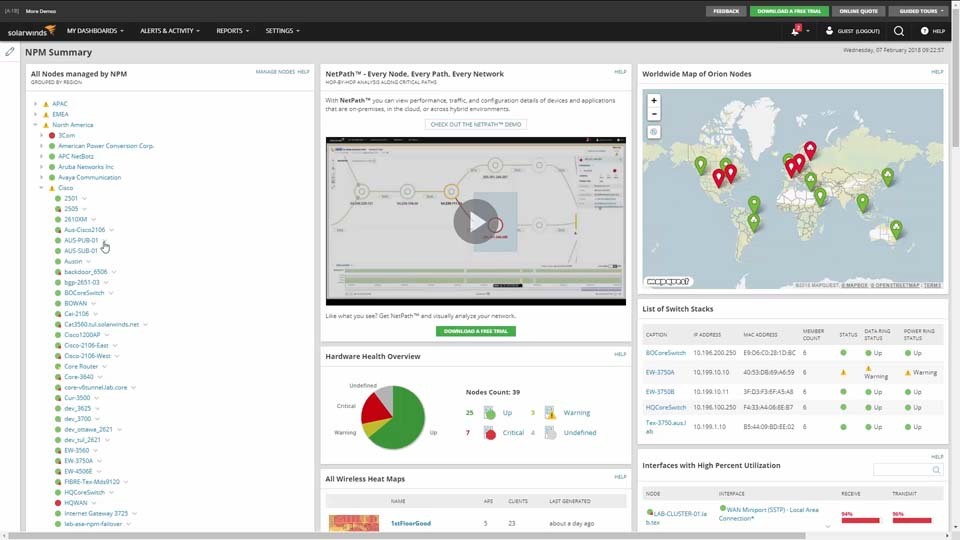
NPM provides comprehensive monitoring on two different levels: devices that support SNMP and devices that don’t support SNMP. NPM is built to offer more detailed network management information for devices supporting SNMP, including network latency, packet loss, and network traffic statistics. NPM can also provide network latency and packet loss information for devices that don’t support SNMP.
NPM is ideal for:
SolarWinds ETS is designed to provide a range of detailed network statistics to help facilitate better analysis, troubleshooting, and provide more granular diagnostics. This solution is ideal for networks with less than 500 network elements, data retention shorter than 30 days, and/or a 2GB limit of stored data.
However, if your network has more than 500 elements, data retention needs longer than 30 days, and unlimited storage, we recommend upgrading to Network Performance Monitor. This network monitoring tool can provide robust support for these elements and includes an intuitive web-based interface.
Choosing between Network Performance Monitor and Engineer’s Toolset can depend on the size of your network, how long you want to retain network data, and what other features you may need. While NPM is designed to be more robust and with more advanced features, ETS is excellent for short-term monitoring and includes over 60 network engineer’s monitoring and management tools.
SolarWinds Engineer’s Toolset combines over 60 of the most essential network software in one collection. This comprehensive solution takes the guesswork out of finding great tools and helps you manage, troubleshoot, and optimize your network with ease.
Some of the most popular network monitoring tools in the toolset are:
You can use any or all these eleven tools to take your network monitoring to the next level. Learn more.
Network monitoring tools are tools to help admins streamline, automate, and optimize network monitoring best practices.
As more devices, endpoints, applications, and servers are added to account for rapidly changing business needs, network monitoring can become more complex and nearly impossible to do manually.
When end users report an error or performance issue, it’s important to find the problem as quickly as possible—but is the problem being caused by an application, too many users, an overall network issue, or something else entirely? How can you easily filter out the noise to pinpoint the true cause of a bottleneck?
To resolve issues quickly, you can use a range of network monitoring tools with pinpointed functions to troubleshoot more effectively. Network monitoring tools should be able to execute the following tasks to help you streamline and optimize your network monitoring best practices:
Network administrator monitoring tools are designed to offer admins the data and metrics necessary to help keep networks healthy.
Network monitoring refers to the practice of routinely checking a network for failures or performance issues, troubleshooting and solving these issues when they occur, and taking proactive measures to prevent problems in the future.
Networks are no longer flat with only a few elements you can manage manually—they’re complex systems with many interconnecting applications, routers, servers, firewalls, devices, and more. Network monitoring can help make sure everything within the network is functioning at its highest capacity.
Network monitoring should also include checking hardware health to make sure critical appliances stay online. Relevant metrics include CPU utilization, temperature, fan speed, and power supply.
Tracking availability is also important for comprehensive network monitoring, which includes observing the resources within a system to make sure they’re available to meet requirements and strive for 100% uptime. Some technologies designed to help with availability monitoring are Ping, SNMP, WMI, IPSLA, and Telnet.
Network monitoring is an extremely important but often complex task. Admins know you can’t monitor your network once a month or even once every two weeks—a network must be monitored constantly to keep it healthy, which is why manual network monitoring can be too time-consuming and labor-intensive to be effective.
Benefits of network monitoring include helping you:
Using network monitoring tools can help you more easily follow these network monitoring best practices.
Two of the most popular network monitoring tools from SolarWinds are Network Performance Monitor (NPM) and Engineer’s Toolset. Both tools are designed to help you meet your network monitoring needs, but which one of these monitoring tools are better for network engineers to choose?
NPM provides comprehensive monitoring on two different levels: devices that support SNMP and devices that don’t support SNMP. NPM is built to offer more detailed network management information for devices supporting SNMP, including network latency, packet loss, and network traffic statistics. NPM can also provide network latency and packet loss information for devices that don’t support SNMP.
NPM is ideal for:
SolarWinds ETS is designed to provide a range of detailed network statistics to help facilitate better analysis, troubleshooting, and provide more granular diagnostics. This solution is ideal for networks with less than 500 network elements, data retention shorter than 30 days, and/or a 2GB limit of stored data.
However, if your network has more than 500 elements, data retention needs longer than 30 days, and unlimited storage, we recommend upgrading to Network Performance Monitor. This network monitoring tool can provide robust support for these elements and includes an intuitive web-based interface.
Choosing between Network Performance Monitor and Engineer’s Toolset can depend on the size of your network, how long you want to retain network data, and what other features you may need. While NPM is designed to be more robust and with more advanced features, ETS is excellent for short-term monitoring and includes over 60 network engineer’s monitoring and management tools.
SolarWinds Engineer’s Toolset combines over 60 of the most essential network software in one collection. This comprehensive solution takes the guesswork out of finding great tools and helps you manage, troubleshoot, and optimize your network with ease.
Some of the most popular network monitoring tools in the toolset are:
You can use any or all these eleven tools to take your network monitoring to the next level. Learn more.
Engineer's Toolset
Gain critical insight into all aspects of your network, from CPU monitoring to ping testing.
Quickly troubleshoot network performance issues with precise network administrator monitoring tools.
Track latency, bandwidth, load, traffic congestion, device performance, and more.