- Events
-
Partners
- Government
- Customer Portal
- Contact Us
- Contact Sales
-
English
SolarWinds® Engineer’s Toolset™ (ETS) includes a CPU monitor to track and graph the load for multiple devices, providing real-time and historical visibility into critical performance metrics like uptime, errors, and CPU response time across your entire system. This can speed troubleshooting by helping pinpoint the cause of performance issues. The CPU monitoring software also includes powerful auto-discovery features designed to ensure new devices don’t slip through the cracks, which can help minimize configuration and update time.
ETS includes a highly customizable alert functionality, allowing you to define specific thresholds for critical CPU monitoring metrics like disk space, memory utilization, processor time. The moment performance metrics cross critical thresholds, ETS is designed to send alerts via SMS or email to inform you of important performance issues in need of immediate attention. This alerting can eliminate the need for manual, round-the-clock CPU monitoring, freeing you for more important tasks.
ETS’s network performance monitoring tools also include a CPU load monitor that measures interface statistics, memory utilization, and other metrics related to the health of network devices like switches and routers. The CPU load monitor tracks these metrics in real time and displays them in an intuitive dashboard.
Customizable reporting tools allow you to monitor and graph the load on multiple routers concurrently, so you can stay ahead of problems, while also making it easier to examine granular metrics like minimum, maximum, and average load on time-aligned charts.
ETS is designed to give you the tools you need to monitor load on multiple Cisco routers in real time. The CPU load for each router is displayed as a horizontal bar, enabling you to see the current load in relation to the maximum CPU load.
With the SolarWinds Router CPU Load tool in Engineer’s Toolset, warning and alarm thresholds can be independently set for each device. When router load exceeds a defined threshold, the alert messages notify you about the problem immediately. ETS also records the peak load level and timestamps for deeper analysis.
The CPU gauge tool in ETS is built to monitor CPU load on routers, switches, and any end-user workstations running Windows 2000 or newer operating systems. Using the SNMP protocol, the CPU gauge communicates with each remote device and displays the results in a user-friendly graphical gauge, which can be customized to meet your specifications.
CPUs not only regulate the performance of the various applications and programs running on a given device, but they’re also responsible for managing how the device processes and transmits data. This means CPUs are almost constantly in use, which can lead to overheating, damage, and system failure if they’re not kept cool and load properly managed, especially in the case of large, complex systems.
A CPU monitor is a program or application designed to track performance and health metrics related to the central processing unit of a computer or networked device. These tools can grant visibility into each device’s CPU load and resource utilization, so you can detect and resolve performance issues before they impact end users and business operations. For instance, by tracking the demands devices are placing on their CPUs during everyday operations, CPU monitoring software makes it easier for you to identify performance issues before they cause major impacts.
CPU monitors are essential for effectively managing and maintaining network performance, as they can keep you up to date on issues as they develop, while also helping speed up troubleshooting time by providing deeper insights into root causes. CPU monitoring software also typically provides reporting capabilities, which can give you actionable insights for scaling, provisioning additional resources, upgrading hardware to optimizing CPU loads, and pinpointing bottlenecks. CPU monitoring tools can help you more easily highlight extraneous background processes that may be creating unnecessary resource drains, which is useful for ensuring optimal device performance and network uptime.
CPU monitors typically use the SNMP protocol or local communication protocols to assess the current CPU utilization and capacity for locally monitored devices, remote Windows systems, or other networked devices. This allows you to keep an eye on devices with heavy CPU utilization and load, so you can intervene before potential performance issues interrupt typical system performance and business operations.
CPUs are a critical component of computing devices. A device without a healthy and properly functioning CPU is likely to be prone to crashing or performing in an extremely limited capacity—if the device starts up at all. For this reason, CPUs should be monitored and managed in the same way physical devices require regular care and maintenance to ensure proper function and longevity.
CPU monitoring, a subset of network performance monitoring, tracks the health of network devices and is an efficient method of keeping track of overall network function and ensuring optimal performance. CPUs are central to the processing capacity of devices and are good indicators of the capacity of your network at large.
CPU monitoring tools can also help with troubleshooting efforts. By collecting and analyzing data about specific performance metrics—such as CPU load and speed, idle time, processor time, user time, and more—the software can provide valuable insights into device performance issues, while also helping you more easily identify the impact specific devices have on network performance. Diagnostic tools that also monitor a comprehensive set of CPU performance metrics can be used to highlight the aspects of hardware performance responsible for network slowdowns and other issues.
ETS’s CPU monitoring tool offers the ability to easily set and modify the performance metric thresholds that trigger automatic alerts when reached or crossed. The process of creating a new alert in ETS includes:
These options give you granular control over alarm contingencies. For example, notifications can be sent to different team members depending on the event type, day of the week, or time the event trigger activates. ETS alerts can also be sent to other monitoring programs and includes options for the following actions:
SolarWinds Engineer’s Toolset (ETS) includes more than 60 tools designed to assist network administrators in managing their systems more effectively and efficiently. From memory, response time, and CPU monitoring capabilities to DNS auditing and MAC address scanning, ETS provides a powerful and affordable set of functions built by experts.
Automated network discovery simplifies onboarding through tools like advanced subnet calculators, port scanners, and switch port managers, to help ensure consistency of service operations. Real-time network availability and device health monitoring keep administrators up to date on the state of their systems, and diagnostic tools like TraceRoute can help highlight failures in specific bandwidth and network segments, thereby streamlining the troubleshooting process and providing valuable insights that can help to minimize problem resolution time.
Tools like WAN Killer and Ping Sweep allow admins to check available IP addresses, test network connections, and modify network load to be within acceptable parameters. ETS also includes tools specifically for managing Cisco devices and analyzing NetFlow.
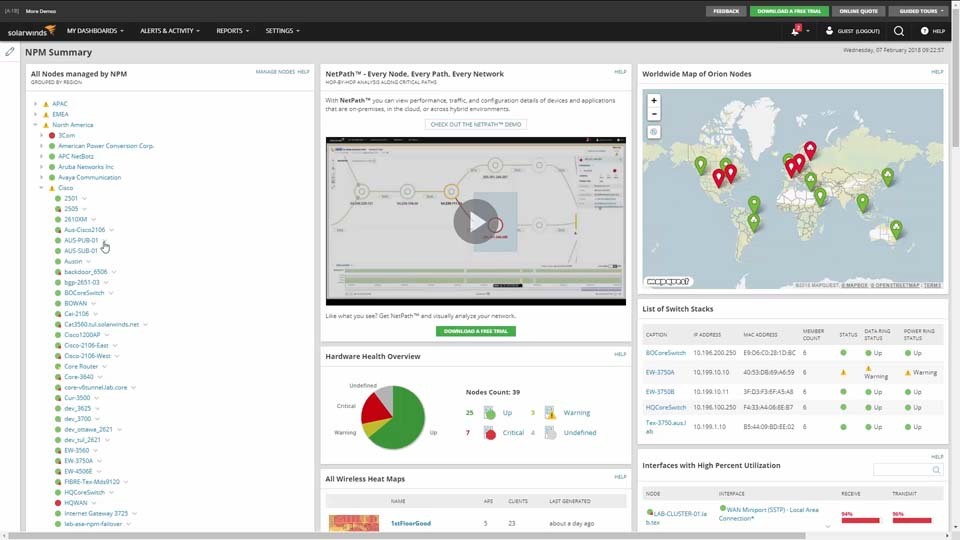
Many of the most popular ETS tools are now available via a convenient and easy-to-use web dashboard, including the CPU monitor, interface monitor, memory monitor, response time monitor, and TraceRoute. ETS tools also seamlessly integrate with SolarWinds Network Performance Monitor (NPM) for even greater monitoring efficiency and enhanced network security.
CPUs not only regulate the performance of the various applications and programs running on a given device, but they’re also responsible for managing how the device processes and transmits data. This means CPUs are almost constantly in use, which can lead to overheating, damage, and system failure if they’re not kept cool and load properly managed, especially in the case of large, complex systems.
A CPU monitor is a program or application designed to track performance and health metrics related to the central processing unit of a computer or networked device. These tools can grant visibility into each device’s CPU load and resource utilization, so you can detect and resolve performance issues before they impact end users and business operations. For instance, by tracking the demands devices are placing on their CPUs during everyday operations, CPU monitoring software makes it easier for you to identify performance issues before they cause major impacts.
CPU monitors are essential for effectively managing and maintaining network performance, as they can keep you up to date on issues as they develop, while also helping speed up troubleshooting time by providing deeper insights into root causes. CPU monitoring software also typically provides reporting capabilities, which can give you actionable insights for scaling, provisioning additional resources, upgrading hardware to optimizing CPU loads, and pinpointing bottlenecks. CPU monitoring tools can help you more easily highlight extraneous background processes that may be creating unnecessary resource drains, which is useful for ensuring optimal device performance and network uptime.
CPU monitors typically use the SNMP protocol or local communication protocols to assess the current CPU utilization and capacity for locally monitored devices, remote Windows systems, or other networked devices. This allows you to keep an eye on devices with heavy CPU utilization and load, so you can intervene before potential performance issues interrupt typical system performance and business operations.
CPUs are a critical component of computing devices. A device without a healthy and properly functioning CPU is likely to be prone to crashing or performing in an extremely limited capacity—if the device starts up at all. For this reason, CPUs should be monitored and managed in the same way physical devices require regular care and maintenance to ensure proper function and longevity.
CPU monitoring, a subset of network performance monitoring, tracks the health of network devices and is an efficient method of keeping track of overall network function and ensuring optimal performance. CPUs are central to the processing capacity of devices and are good indicators of the capacity of your network at large.
CPU monitoring tools can also help with troubleshooting efforts. By collecting and analyzing data about specific performance metrics—such as CPU load and speed, idle time, processor time, user time, and more—the software can provide valuable insights into device performance issues, while also helping you more easily identify the impact specific devices have on network performance. Diagnostic tools that also monitor a comprehensive set of CPU performance metrics can be used to highlight the aspects of hardware performance responsible for network slowdowns and other issues.
ETS’s CPU monitoring tool offers the ability to easily set and modify the performance metric thresholds that trigger automatic alerts when reached or crossed. The process of creating a new alert in ETS includes:
These options give you granular control over alarm contingencies. For example, notifications can be sent to different team members depending on the event type, day of the week, or time the event trigger activates. ETS alerts can also be sent to other monitoring programs and includes options for the following actions:
SolarWinds Engineer’s Toolset (ETS) includes more than 60 tools designed to assist network administrators in managing their systems more effectively and efficiently. From memory, response time, and CPU monitoring capabilities to DNS auditing and MAC address scanning, ETS provides a powerful and affordable set of functions built by experts.
Automated network discovery simplifies onboarding through tools like advanced subnet calculators, port scanners, and switch port managers, to help ensure consistency of service operations. Real-time network availability and device health monitoring keep administrators up to date on the state of their systems, and diagnostic tools like TraceRoute can help highlight failures in specific bandwidth and network segments, thereby streamlining the troubleshooting process and providing valuable insights that can help to minimize problem resolution time.
Tools like WAN Killer and Ping Sweep allow admins to check available IP addresses, test network connections, and modify network load to be within acceptable parameters. ETS also includes tools specifically for managing Cisco devices and analyzing NetFlow.
Many of the most popular ETS tools are now available via a convenient and easy-to-use web dashboard, including the CPU monitor, interface monitor, memory monitor, response time monitor, and TraceRoute. ETS tools also seamlessly integrate with SolarWinds Network Performance Monitor (NPM) for even greater monitoring efficiency and enhanced network security.
Engineer’s Toolset
Monitor critical CPU metrics displayed on graphical gauges.
Track device availability, memory utilization, CPU load monitoring, interface statistics, and more.
Troubleshoot network issues with enhanced ping capabilities and packet route tracing.