- Events
-
Partners
- Government
- Customer Portal
- Contact Us
- Contact Sales
-
English
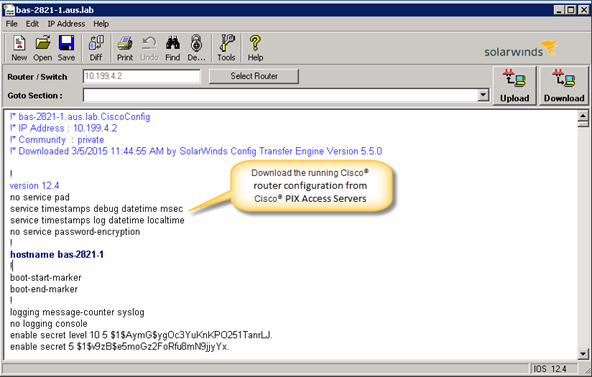
SolarWinds Engineer’s Toolset Config Editor/Viewer can quickly download the running configuration of a Cisco router and automatically archive it for future reference. Config Viewer has the capability to decrypt Cisco type 7 passwords. In turn, this tool can quickly decrypt all the login passwords after downloading the running configurations from Cisco PIX or Access Servers, like AS5200. With this configuration viewer tool, you can compare the configurations of different routers and switches, or compare an older version with the current configuration.
A configuration management tool is a router configuration software that can be used to:
The config editor/viewer tool comes with SolarWinds Engineer’s Toolset, which is a collection of essential diagnostic, monitoring, discovery, and troubleshooting tools that network engineer’s rely on to perform daily IT tasks. Once you install Engineer’s Toolset, you can quickly locate ‘Config Viewer’ in the ‘Configuration Management’ folder in the Workspace Studio. You can also search for ‘Config Viewer’ in the Workspace Studio.

You can use the Config Viewer tool to download the running configuration of a Cisco router and automatically archive for future reference. Additionally, this tool can decrypt configuration files that are encrypted with a type 7 password. Further, this editor tool allows you to make changes to the configurations and upload to the selected router or multiple devices. To start the download/upload, enter the device name/IP address and its credentials, then run the comparison. You can also do a line-by-line comparison of a running Cisco configuration file with the startup configuration file.
With this config editor/viewer tool you can:
Engineer's Toolset
Automatically discover network devices as well as map network topology.
Track device availability, memory utilization, CPU load, interface statistics, and performance & latency of network paths.
Quickly troubleshoot your network with enhanced ping capabilities and packet route tracing.


