Ping Monitor Software

Ping software continuously monitors device response time

  • Select devices you want to ping

    Choose the device you want to continuously monitor for response time.

  • Log statistics

    Ping software monitoring data can be exported via text files, while graphs and images can be exported via image files.

  • Graph results

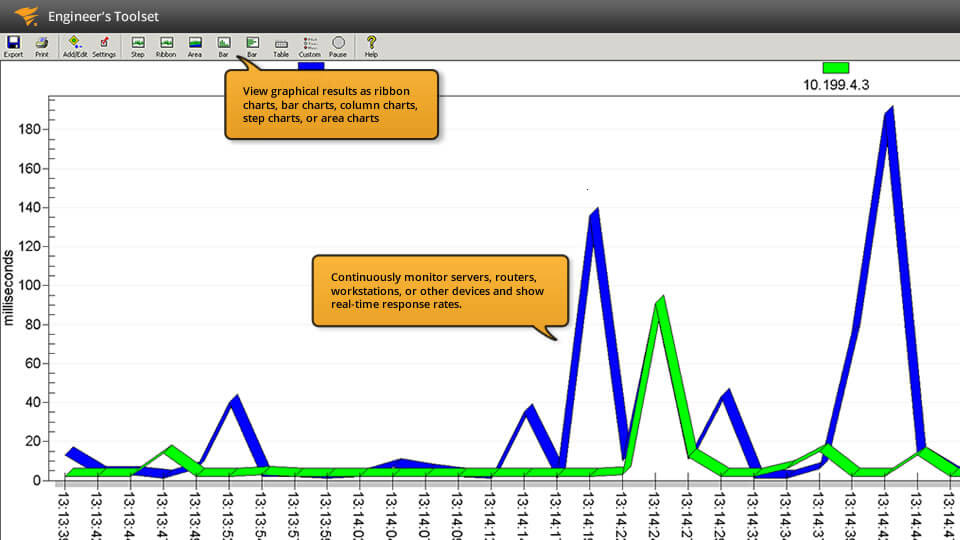
    The Ping graph tool can provide results in ribbon, bar, column, step, or area charts.

  • Develop a custom profile

    Create and load custom profiles to monitor a specific set of devices.

See More
See Less

Simple and advanced ping monitor

Simple and advanced ping monitor

Diagnose network problems by continuously monitoring servers, routers, workstations, or other devices to show response time in real-time and display response rates in graphical charts with Engineer’s Toolset (ETS). ETS includes both a “simple ping” tool, an alternative to the Ping utility of the operating system that sends ICMP packets to a target IP address to measure the response time and packet loss, as well as an Enhanced Ping tool, which provides a number of graphing options to help visualize and more easily identify response-time problems. These ping software tool solutions help ensure you gain the visibility you need to troubleshoot network connection issues.

Network diagnostics with Engineer’s Toolset

Network diagnostics with Engineer’s Toolset

SolarWinds® Engineer’s Toolset offers over 60 must-have network management and troubleshooting tools. Within this package of useful tools, you get access to network diagnostics tools like Ping, Enhanced Ping, and more, including Ping Sweep, DNS Analyzer, and TraceRoute. This robust set of diagnostic tools will enable you to quickly resolve even the most complex network issues.

Over 60 time-saving IT tools

Over 60 time-saving IT tools

In the fast-paced world of IT, having the right tools makes all the difference. With Engineer’s Toolset’s 60+ tools, you’ll be able to comprehensively and effectively manage and troubleshoot your network with tools for network monitoring, diagnostics, discovery, config management, log management, IP address monitoring, SNMP, and security. All of these tools are easily accessible from a unified desktop console. Also included in ETS is online access to five of our most popular tools: Response Time Monitor, Interface Monitor, CPU Monitor, Memory Monitor, and TraceRoute. Download a free trial and find out how Engineer’s Toolset can help you manage and troubleshoot your network.

Gain easy access to 60+ must have IT tools including simple and advanced ping software monitoring

Engineer's Toolset

  • Automatically discover network devices as well as map network topology.

  • Track device availability, memory utilization, CPU load, interface statistics, and performance & latency of network paths.

  • Quickly troubleshoot your network with enhanced ping capabilities and packet route tracing.

Starts at {#Product Price#}
Let’s talk it over.
Contact our team. Anytime.
{#Contact Phone#}
{{STATIC CONTENT}}
{{CAPTION_TITLE}}

{{CAPTION_CONTENT}}

{{TITLE}}