- Events
-
Partners
- Government
- Customer Portal
- Contact Us
- Contact Sales
-
English
SQL database tuning is essential for improving performance, but comprehensive SQL database performance monitoring often requires a multi-dimensional approach. The best SQL database tools can easily correlate database activity, focus on wait times and query response times, look into resource utilization, and much more.
SolarWinds® Database Performance Analyzer (DPA) is designed to help database administrators gain greater insight into these and other factors contributing to performance issues.
Response time analysis is a SolarWinds DPA feature designed to help database administrators more easily troubleshoot performance issues. This approach is built to measure how long it takes a database to process a query, which can be a useful indicator of how well the database is performing.
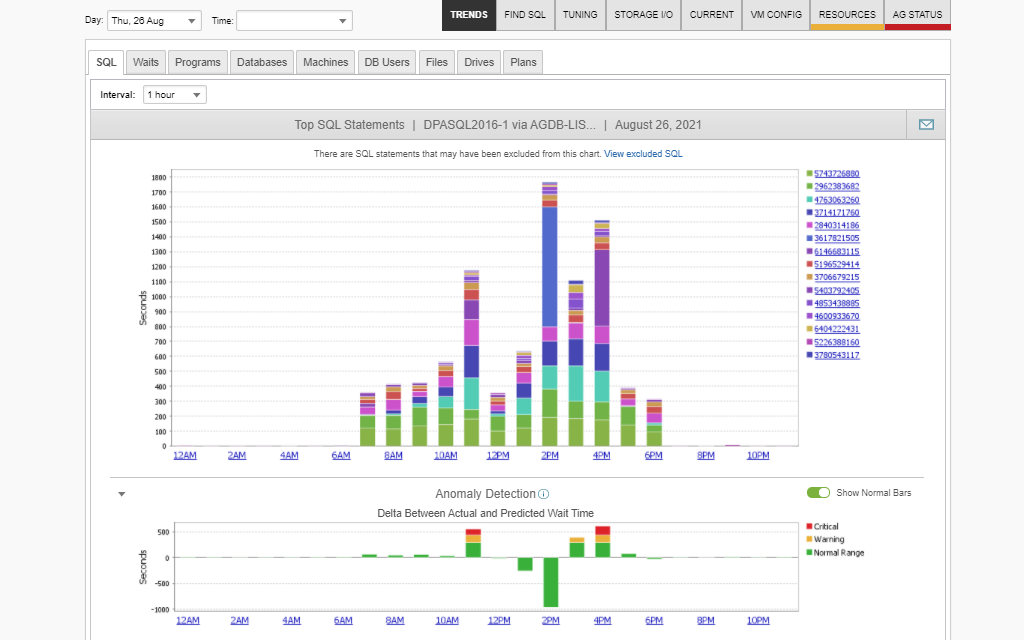
You can use this insight to pinpoint bottlenecks and prioritize troubleshooting actions before slowdowns impact end users. DPA is designed to gather SQL data every second and rank statement data by response time to help you quickly identify which queries need attention.
SolarWinds DPA is built to monitor your database 24/7 with less than 1% load. With insight into data points from both five seconds ago and five years ago, database administrators gain a more comprehensive view of database performance.
Not only is DPA built to constantly monitor SQL Server, Oracle, MySQL, DB2, VMware, and SAP ASE databases, it can also consolidate the performance data into one unified view, so you can more quickly find root causes of performance issues across your environment in a few clicks.
SQL database performance optimization can encompass much more than tuning SQL queries. Database administrators should also be aware of SQL database performance, as it can have a direct impact on resource provisioning.
The SQL database tool in SolarWinds DPA can help database administrators more easily find root causes and determine how many resources must be devoted to particular performance issues—no more, no less. This can help prevent unnecessarily spending money on unnecessary hardware.
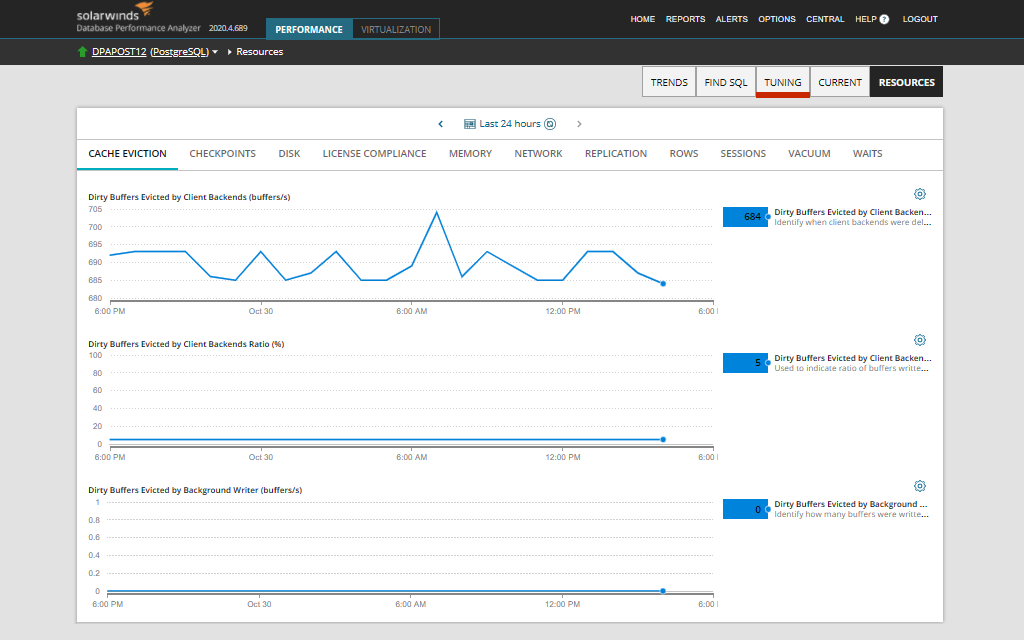
Tuning can go more quickly if you know exactly where to begin with SQL database server tuning. The Table Tuning Advisor in DPA is built to show the aggregated information about each table and the inefficient SQL queries running against it, assigning an inefficiency score to each query and ranking them from least to most efficient. From there, the tuning advisor recommends the best course of action based on the data with reset warnings including predicate, lookup, spool, and parallel.
A SQL database tool is specifically designed to manage, monitor, and provide tuning advice for relational database management systems (RDBMS) and SQL (Structured Query Language) data.
SQL database tools are built to help database administrators more easily and quickly perform monitoring and management tasks, including query tuning. Once you have all relevant information in one place, it can be much easier to glean actionable insights about your system and use those insights to improve performance.
A SQL database tool can help database administrators monitor, manage, and optimize SQL database performance by automating the most time-consuming SQL database performance monitoring processes.
A SQL database tool starts by collecting SQL query and statement data and cross-referencing it against various important metrics, like wait times or query response times. This information establishes a baseline for your SQL database performance and can make it easier to keep track of any abnormal behavior.
For example, SolarWinds Database Performance Analyzer is built to constantly collect query data from your SQL database, so you can drill down on wait times. You can also use the tool to investigate momentary slowdowns during the day or conduct a more expansive query analysis to find out whether wait times for a particular query are higher or lower than expected based on 30 days of past data.
If a SQL database tool identifies abnormal behavior or a sudden change in SQL database performance, it can send out an alert to allow you to address it immediately and stop issues before they affect end users and overall performance.
If you want to speed the troubleshooting process, the best SQL database tools are designed to offer SQL database performance monitoring advice. For instance, DPA can highlight and triage inefficient queries to offer you guidance on what corrective action should be taken and in what order. This capability can help you make the best decision for tuning performance in your SQL database.
A SQL database tool can help streamline the monitoring and tuning process, which can lead to more efficient SQL Server performance.
Many businesses rely on an RDBMS of some kind, such as a business with an online presence using a database to store operational information along with information end users might want to access. When the database is performing well, so do its associated applications and services. Indexes and queries can speed up data retrieval by supplying shortcuts to be used within the database, but inefficient indexes and queries can slow down performance.
However, manually monitoring database instances for these slowdowns can be time-consuming and is often labor-intensive. Also, without database performance baselines, it can be hard to pinpoint root causes of issues. Are wait times higher or lower than usual? Which statements are consistently problematic? What needs to be optimized first?
A SQL database tool can help database administrators navigate these pain points by automating many aspects of SQL database performance monitoring and the SQL database tuning process. With an automated tool, DBAs can benefit from the following:
A SQL database tool is built to take all of the guesswork out of SQL database performance monitoring and optimization.
SQL database performance tuning can be broken down into two broad categories—basic query analysis and advanced query analysis. To perform basic query analysis, database administrators must have critical visibility into their SQL statements and various metrics associated with it like wait times and missing or unused indexes.
Once you’re familiar with your database and how it’s performing with its current configuration, you can move on to advanced query analysis. Advanced query analysis includes a series of steps to analyze your database and ensure it’s running as efficiently as possible. This includes making use of constraints, examining execution plans, making small adjustments to your indexes and queries as necessary, and testing the results.
Manual SQL database tuning can require you to change many variables to see how they affect performance. However, SQL database tools are designed to make it easier to tune databases by streamlining, automating, and doing the heavy lifting for you when it comes to optimizing basic and advanced query analysis. For example, you can click on an intuitive chart to find performance slowdowns using SolarWinds DPA. Or, to figure out the best way to tackle inefficient queries, you can use the integrated Table Tuning Advisor.
Aside from performing both basic and advanced query analysis, a SQL database tool should also:
SolarWinds Database Performance Analyzer is a comprehensive SQL database tool designed to help database administrators pinpoint performance issues in virtual, physical, and cloud-based environments. The tool is built to provide round-the-clock SQL database performance monitoring and can display all relevant metrics on a unified, intuitive dashboard. DPA’s agentless architecture also makes it lightweight to run, producing less than 1% load.
Using DPA, you can more easily drill down on performance issues using wait-based analytics and response time analysis. You can also leverage historical and real-time data gathered by machine learning to determine if any elements are performing abnormally. SolarWinds DPA also gives you the ability to set custom alerts and reports to keep you updated on database performance issues, so you can resolve them before they begin to affect end users. With expert recommendations provided by the Table Tuning Advisor, you can more quickly tackle the most pressing performance issues first and learn how to optimize your indexes in the future.
A SQL database tool is specifically designed to manage, monitor, and provide tuning advice for relational database management systems (RDBMS) and SQL (Structured Query Language) data.
SQL database tools are built to help database administrators more easily and quickly perform monitoring and management tasks, including query tuning. Once you have all relevant information in one place, it can be much easier to glean actionable insights about your system and use those insights to improve performance.
A SQL database tool can help database administrators monitor, manage, and optimize SQL database performance by automating the most time-consuming SQL database performance monitoring processes.
A SQL database tool starts by collecting SQL query and statement data and cross-referencing it against various important metrics, like wait times or query response times. This information establishes a baseline for your SQL database performance and can make it easier to keep track of any abnormal behavior.
For example, SolarWinds Database Performance Analyzer is built to constantly collect query data from your SQL database, so you can drill down on wait times. You can also use the tool to investigate momentary slowdowns during the day or conduct a more expansive query analysis to find out whether wait times for a particular query are higher or lower than expected based on 30 days of past data.
If a SQL database tool identifies abnormal behavior or a sudden change in SQL database performance, it can send out an alert to allow you to address it immediately and stop issues before they affect end users and overall performance.
If you want to speed the troubleshooting process, the best SQL database tools are designed to offer SQL database performance monitoring advice. For instance, DPA can highlight and triage inefficient queries to offer you guidance on what corrective action should be taken and in what order. This capability can help you make the best decision for tuning performance in your SQL database.
A SQL database tool can help streamline the monitoring and tuning process, which can lead to more efficient SQL Server performance.
Many businesses rely on an RDBMS of some kind, such as a business with an online presence using a database to store operational information along with information end users might want to access. When the database is performing well, so do its associated applications and services. Indexes and queries can speed up data retrieval by supplying shortcuts to be used within the database, but inefficient indexes and queries can slow down performance.
However, manually monitoring database instances for these slowdowns can be time-consuming and is often labor-intensive. Also, without database performance baselines, it can be hard to pinpoint root causes of issues. Are wait times higher or lower than usual? Which statements are consistently problematic? What needs to be optimized first?
A SQL database tool can help database administrators navigate these pain points by automating many aspects of SQL database performance monitoring and the SQL database tuning process. With an automated tool, DBAs can benefit from the following:
A SQL database tool is built to take all of the guesswork out of SQL database performance monitoring and optimization.
SQL database performance tuning can be broken down into two broad categories—basic query analysis and advanced query analysis. To perform basic query analysis, database administrators must have critical visibility into their SQL statements and various metrics associated with it like wait times and missing or unused indexes.
Once you’re familiar with your database and how it’s performing with its current configuration, you can move on to advanced query analysis. Advanced query analysis includes a series of steps to analyze your database and ensure it’s running as efficiently as possible. This includes making use of constraints, examining execution plans, making small adjustments to your indexes and queries as necessary, and testing the results.
Manual SQL database tuning can require you to change many variables to see how they affect performance. However, SQL database tools are designed to make it easier to tune databases by streamlining, automating, and doing the heavy lifting for you when it comes to optimizing basic and advanced query analysis. For example, you can click on an intuitive chart to find performance slowdowns using SolarWinds DPA. Or, to figure out the best way to tackle inefficient queries, you can use the integrated Table Tuning Advisor.
Aside from performing both basic and advanced query analysis, a SQL database tool should also:
SolarWinds Database Performance Analyzer is a comprehensive SQL database tool designed to help database administrators pinpoint performance issues in virtual, physical, and cloud-based environments. The tool is built to provide round-the-clock SQL database performance monitoring and can display all relevant metrics on a unified, intuitive dashboard. DPA’s agentless architecture also makes it lightweight to run, producing less than 1% load.
Using DPA, you can more easily drill down on performance issues using wait-based analytics and response time analysis. You can also leverage historical and real-time data gathered by machine learning to determine if any elements are performing abnormally. SolarWinds DPA also gives you the ability to set custom alerts and reports to keep you updated on database performance issues, so you can resolve them before they begin to affect end users. With expert recommendations provided by the Table Tuning Advisor, you can more quickly tackle the most pressing performance issues first and learn how to optimize your indexes in the future.
Database Performance Analyzer
Unlock 24/7 SQL database performance monitoring.
Get high-quality SQL database tuning advice from the integrated Table Tuning Advisor.
More easily manage and tune queries to improve SQL database performance.