Remote Computer Management and Administration

Use Dameware Remote Support for faster remote desktop support and administration

See More
See Less

Built-in powerful utilities and tools

Built-in powerful utilities and tools

With powerful functionality to manage Windows machines, Active Directory (AD), and Exchange, Dameware Remote Support is designed to help you to manage, control, and troubleshoot computers in and outside your corporate network from a single interface.

  • Manage and administer Windows computers without initiating remote sessions
  • Add, remove, and update Active Directory objects and attributes
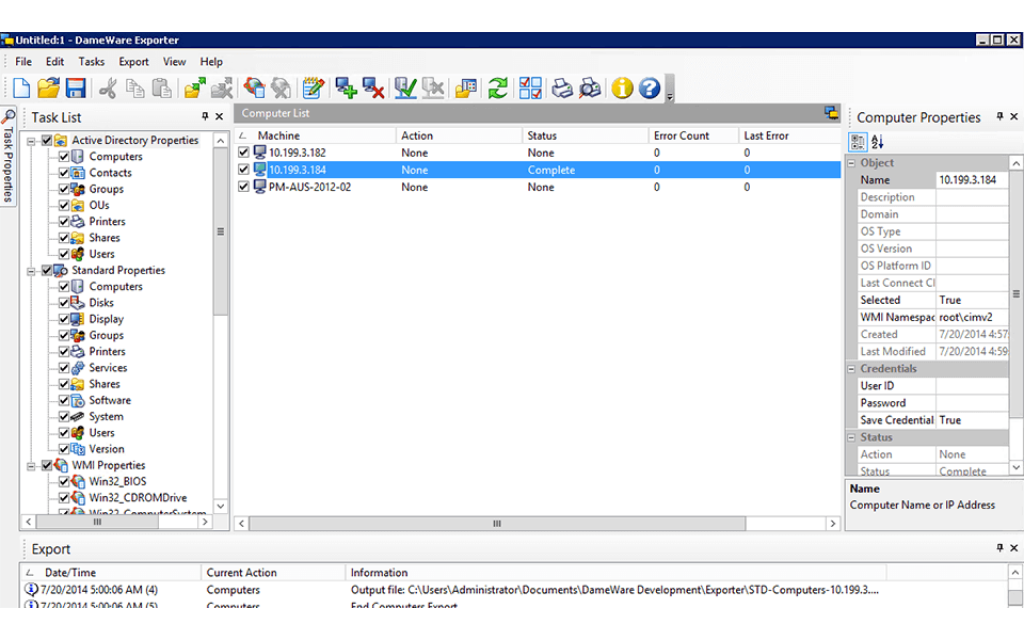
  • Export network and workstation configurations for compliance reporting
  • Initiate secure over-the-internet remote connections to computers outside the firewall

Simplify troubleshooting and routine management tasks

Simplify troubleshooting and routine management tasks

Dameware Remote Support is an enhanced remote administration tool with built-in system tools and TCP utilities. With Dameware Remote Support, you can manage Windows computers remotely:

  • Start, stop, and restart Windows services
  • Reboot unattended Windows computers when they crash
  • View and stop Windows processes
  • View and clear the Windows Event Log
  • Run custom scripts
  • View performance statistics
  • Copy and delete files
  • Add and delete network shares and more

Export AD objects and Windows configurations

Export AD objects and Windows configurations

Dameware Remote Support provides a built-in remote administration tool that allows you to export information from Windows servers, laptops, and Active Directory controllers. You can export system configurations in XML and CSV formats, and understand how each system in your network is configured, and more

  • Create an inventory of the software installed on each Windows system
  • Export AD objects and attributes
  • Bulk export configuration settings for selected computers
  • Create custom exports based on WMI Properties


Remote control Windows, Mac OS X, and Linux computers

Remote control Windows, Mac OS X, and Linux computers

Leverage built-in remote control and desktop sharing tools to remotely connect to Windows, Mac OS X, and Linux computers. Dameware Remote Support offers a range of helpful tools and utilities, such as chat, file transfer, screenshot capture, print, etc., to easily connect with multiple remote computers, and offer a quicker resolution to their end-users’ problems. You can also gain access to unattended, powered-off, sleeping, hibernating, or even crashed computers inside and outside your corporate network.
"We use Dameware to support 3,200 users. Dameware is well worth the price to fix problems in multiple locations."
Warren Bankson
Chief Security Officer
Arkansas Department of Corrections

Simple remote desktop management and administration tool

Dameware Remote Support

  • Sometimes getting to the root of an IT issue involves going right to the source.

  • IT issues know no bounds, so why should the ability to troubleshoot IT issues only be reserved for machines on the network?

  • IT admins have enough on their plates without having to make house calls for IT troubleshooting.

Starts at {#Product Price#} No monthly fees, connect to unlimited end devices
Let’s talk it over.
Contact our team. Anytime.
{#Contact Phone#}
{{STATIC CONTENT}}
{{CAPTION_TITLE}}

{{CAPTION_CONTENT}}

{{TITLE}}