- Events
-
Partners
- Government
- Customer Portal
- Contact Us
- Contact Sales
-
English
An IP tracker scans IP resources throughout a network to identify changes to information or status. Without an automated solution to IP tracking, the manual process involves keeping IP addresses on spreadsheets. This can be a complex and unwieldy process and is practically impossible for large networks.
An automated tool makes the process easier. As changes occur within a subnet, a network IP tracker can record the status change using a timestamp, providing insight into how devices use addresses over time—all from a centralized dashboard providing straightforward visibility.
IP address tracking software offers benefits beyond organizing address data.
An IP address tracker is designed to help avoid IP conflicts or duplications, which in turn helps prevent costly downtime.
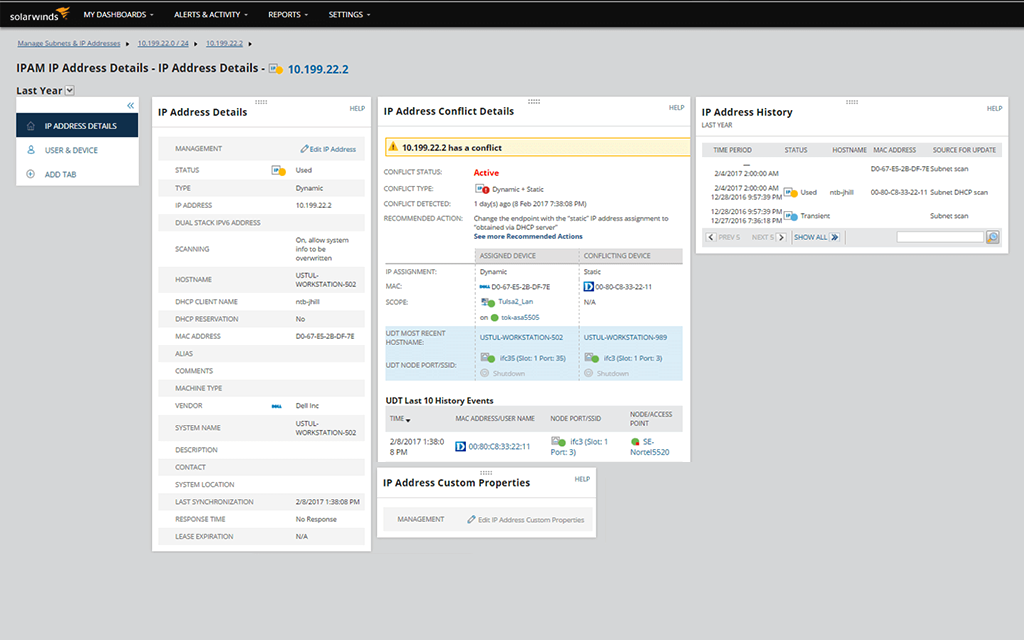
In addition to automatically identifying IPv4 and IPv6 addresses, an IP address tracker allows admins to view change histories and current usage settings. This ability to gain instant visibility into network performance issues helps streamline troubleshooting.
Overall, an automated tool for tracking can lead to improved service, reduced troubleshooting time, and lowered costs.
It’s easy to track IPv4 and IPv6 addresses within IPAM. The software automatically discovers IPv4 subnets once you specify a default gateway, and you can use the wizard to create IPv6 subnets as well. IPAM then scans router ARP tables and creates profiles on managed subnets. IPAM regularly scans addresses within these subnets and keeps track of status and changes related to usage, DHCP settings, MAC address, vendor type, and other custom fields. IPAM uses ICMP, SNMP, and neighborhood scanning to update IP information and mark unused IP addresses.
Though free IP tracker software can help provide surface-level insights, these tools often have restrictive caps on the number of tracked IPs as well as other limited features designed mostly for smaller environments. However, the number of IP changes, overlaps, and conflicts will often become more frequent, and growing businesses and networks need deeper management insights.
SolarWinds IPAM can manage up to two million IP addresses to help ensure all devices on a network are tracked. Unlike free IP tracker tools, IPAM also includes advanced abilities to integrate DNS and DHCP management (including multi-vendor support), create alerts, pull reports, schedule scanning, and automate static requests.
With a user-friendly tool, getting started can be an intuitive process. With SolarWinds IPAM, downloading the software is as simple as clicking a button. Once you’ve started your 30-day free trial, you can get started with the steps below:
First, network admins will need a SolarWinds ID and a SolarWinds customer portal account. Once these credentials have been set up, moving forward with tracking will require a server to be used for the software. This can either be a stand-alone server—which is only used for SolarWinds IPAM—or a SolarWinds server. For admins who wish to integrate IPAM with other network management tools, the SolarWinds server is a good bet.
Once the portal account and server are established, it’s time to select a license for the IPAM product. There are two different types of licenses available for IPAM: a full license or an evaluation license. An evaluation license supports a subscription, while a full license supports the perpetual use of the software. Before downloading IPAM onto a server, it’s important to understand which license works best for your specific needs.
Getting started is as easy as setting up an account, clicking a few buttons, and filling out a license form. After these easy steps, it’s time to get started downloading and installing IPAM onto a server.
For more information about how to configure and deploy this tool, the SolarWinds IPAM Installation Guide offers detailed instructions for getting started.
SolarWinds IPAM offers a fully functional 30-day free trial so businesses can get an accurate understanding of the software’s capabilities before investing in a licensed version.
Accessing the free trial is as easy as establishing the prerequisites for a download—a SolarWinds ID, a customer portal account, and an available server for the software. Then, admins have access to the fully functional IPAM tool for 30 days. Free trials are especially useful for companies that urgently need to address IP configuration issues but might not be ready to invest in an IPAM contract. The functionalities of IP tracking offered in IPAM (both the free trial and licensed versions) include the following:
In addition to these functionalities, SolarWinds IPAM offers a complete suite of IP address management services, from DNS and DHCP configuration management to Infoblox monitoring, integration with VMware for monitoring in virtual environments, and more. Whether it’s a free trial or a paid version, SolarWinds IPAM is a complete IP address management solution.
SolarWinds IPAM allows network admins to track IP addresses as part of a comprehensive management strategy. Manual address tracking is a complex process involving spreadsheets that can quickly become impossible to manage as networks reach thousands or millions of IP addresses.
Size isn’t the only issue when it comes to tracking IP addresses—automation allows admins to improve accuracy while minimizing downtime. Large and small networks alike can benefit from IPAM, as it helps avoid human error and update IP status in real time.
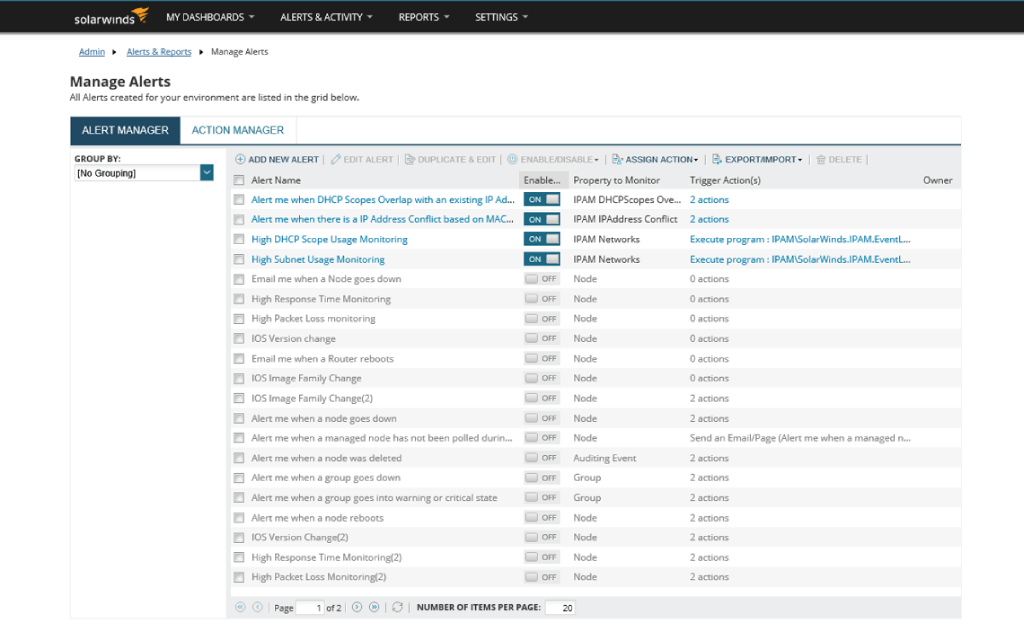
IPAM offers a unique solution for IP address tracking. Real-time discovery, management, and alerting allow network admins to manage IPv4 and IPv6 addresses intuitively. From a centralized IPAM dashboard, admins can get complete insights into IP address capacity, configuration, and health, all while managing subnets to avoid future issues. By combining IP address tracking with other IP management services, IPAM offers complex monitoring from a simple, centralized dashboard.
IPAM can also be deployed using the SolarWinds Platform for integration with other SolarWinds products. No matter which licensing option you choose, the full functionalities of IPAM are available with your SolarWinds subscription.
An IP tracker scans IP resources throughout a network to identify changes to information or status. Without an automated solution to IP tracking, the manual process involves keeping IP addresses on spreadsheets. This can be a complex and unwieldy process and is practically impossible for large networks.
An automated tool makes the process easier. As changes occur within a subnet, a network IP tracker can record the status change using a timestamp, providing insight into how devices use addresses over time—all from a centralized dashboard providing straightforward visibility.
IP address tracking software offers benefits beyond organizing address data.
An IP address tracker is designed to help avoid IP conflicts or duplications, which in turn helps prevent costly downtime.
In addition to automatically identifying IPv4 and IPv6 addresses, an IP address tracker allows admins to view change histories and current usage settings. This ability to gain instant visibility into network performance issues helps streamline troubleshooting.
Overall, an automated tool for tracking can lead to improved service, reduced troubleshooting time, and lowered costs.
It’s easy to track IPv4 and IPv6 addresses within IPAM. The software automatically discovers IPv4 subnets once you specify a default gateway, and you can use the wizard to create IPv6 subnets as well. IPAM then scans router ARP tables and creates profiles on managed subnets. IPAM regularly scans addresses within these subnets and keeps track of status and changes related to usage, DHCP settings, MAC address, vendor type, and other custom fields. IPAM uses ICMP, SNMP, and neighborhood scanning to update IP information and mark unused IP addresses.
Though free IP tracker software can help provide surface-level insights, these tools often have restrictive caps on the number of tracked IPs as well as other limited features designed mostly for smaller environments. However, the number of IP changes, overlaps, and conflicts will often become more frequent, and growing businesses and networks need deeper management insights.
SolarWinds IPAM can manage up to two million IP addresses to help ensure all devices on a network are tracked. Unlike free IP tracker tools, IPAM also includes advanced abilities to integrate DNS and DHCP management (including multi-vendor support), create alerts, pull reports, schedule scanning, and automate static requests.
With a user-friendly tool, getting started can be an intuitive process. With SolarWinds IPAM, downloading the software is as simple as clicking a button. Once you’ve started your 30-day free trial, you can get started with the steps below:
First, network admins will need a SolarWinds ID and a SolarWinds customer portal account. Once these credentials have been set up, moving forward with tracking will require a server to be used for the software. This can either be a stand-alone server—which is only used for SolarWinds IPAM—or a SolarWinds server. For admins who wish to integrate IPAM with other network management tools, the SolarWinds server is a good bet.
Once the portal account and server are established, it’s time to select a license for the IPAM product. There are two different types of licenses available for IPAM: a full license or an evaluation license. An evaluation license supports a subscription, while a full license supports the perpetual use of the software. Before downloading IPAM onto a server, it’s important to understand which license works best for your specific needs.
Getting started is as easy as setting up an account, clicking a few buttons, and filling out a license form. After these easy steps, it’s time to get started downloading and installing IPAM onto a server.
For more information about how to configure and deploy this tool, the SolarWinds IPAM Installation Guide offers detailed instructions for getting started.
SolarWinds IPAM offers a fully functional 30-day free trial so businesses can get an accurate understanding of the software’s capabilities before investing in a licensed version.
Accessing the free trial is as easy as establishing the prerequisites for a download—a SolarWinds ID, a customer portal account, and an available server for the software. Then, admins have access to the fully functional IPAM tool for 30 days. Free trials are especially useful for companies that urgently need to address IP configuration issues but might not be ready to invest in an IPAM contract. The functionalities of IP tracking offered in IPAM (both the free trial and licensed versions) include the following:
In addition to these functionalities, SolarWinds IPAM offers a complete suite of IP address management services, from DNS and DHCP configuration management to Infoblox monitoring, integration with VMware for monitoring in virtual environments, and more. Whether it’s a free trial or a paid version, SolarWinds IPAM is a complete IP address management solution.
SolarWinds IPAM allows network admins to track IP addresses as part of a comprehensive management strategy. Manual address tracking is a complex process involving spreadsheets that can quickly become impossible to manage as networks reach thousands or millions of IP addresses.
Size isn’t the only issue when it comes to tracking IP addresses—automation allows admins to improve accuracy while minimizing downtime. Large and small networks alike can benefit from IPAM, as it helps avoid human error and update IP status in real time.
IPAM offers a unique solution for IP address tracking. Real-time discovery, management, and alerting allow network admins to manage IPv4 and IPv6 addresses intuitively. From a centralized IPAM dashboard, admins can get complete insights into IP address capacity, configuration, and health, all while managing subnets to avoid future issues. By combining IP address tracking with other IP management services, IPAM offers complex monitoring from a simple, centralized dashboard.
IPAM can also be deployed using the SolarWinds Platform for integration with other SolarWinds products. No matter which licensing option you choose, the full functionalities of IPAM are available with your SolarWinds subscription.
IP Address Manager
Use insights into current and changing IP data to be proactive about IP address issues.
Perform IP address tracking more effectively by using organized subnets and hierarchies.
Gain insights into historical IP address usage to resolve conflicts and allocate resources.