- Events
-
Partners
- Government
- Customer Portal
- Contact Us
- Contact Sales
-
English
SolarWinds® Patch Manager is built to automatically scan endpoint nodes across the network to determine which devices need patching, which can help give you more control over which collections of devices receive which patches and at what time.
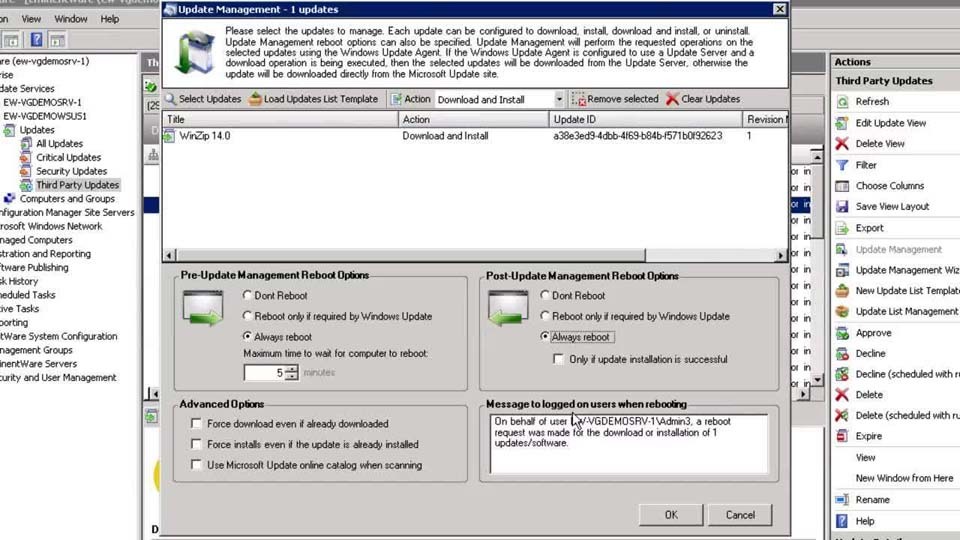
Flexible scheduling tools in Patch Manager can allow you to quickly and efficiently deploy patches to multiple devices across different computing environments on different schedules, meaning you can set patches to run during periods of low use or downtime to prevent service interruptions.
The reporting system in Patch Manager is designed to keep you notified of both successful and failed patch deployments, allowing you to more easily demonstrate to auditors and stakeholders your systems are in compliance.
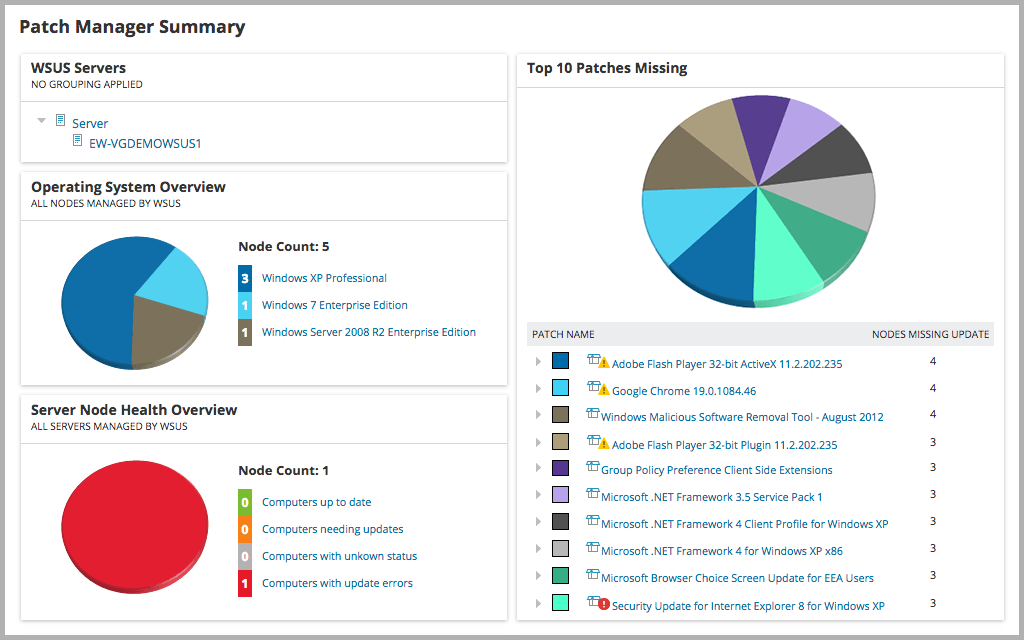
Patch Manager’s easy-to-use dashboard can also make it simple to locate systems not in compliance, so you can quickly resolve the issue. The dashboards are built to display several other metrics as well, including the top ten missing patches across your devices and a general health assessment of your environment.
Using software to automate and manage the patching process can allow for faster and more efficient patch management. Automated patch management can help simplify the process of keeping operating systems and applications up to date by first automating scans to check devices within the environment to determine which patches each system, software, or app is missing. Then, automated deployment can send the appropriate patches to all relevant devices.
To automate Windows patching, you can use Windows Server Update Services (WSUS) and Microsoft update agent as central patch repositories downloading updates from the Microsoft update server for Windows systems. System Center Configuration Manager (SCCM) is another tool to help users manage a large amount of Windows computers at once. However, WSUS and SCCM offers only limited capabilities, visibility, and support for non-Windows applications and systems.
For more comprehensive patch automation—including scheduling features, insights into patching completion, and third-party patching solutions—a purpose-built automated patch management tool can be a better solution.
An automated patching tool can help save users time by eliminating the trouble of manually analyzing, preparing, testing, and deploying software patches individually.
Patch automation tools are built to perform regular scans of an environment—or specific groups of devices—to identify which are missing patches and can download missing patches from individual vendors, such as Adobe, Apple, Java, or Windows.
Automated patch management tools can also help streamline compliance audits, with the ability to run in-depth reports than can help you determine the status of patches to demonstrate patch compliance to auditors and internal stakeholders.
Automated patching can help ensure you can quickly address and get ahead of potential software, operating system, and application vulnerabilities. Automated patching can help reduce the risk of unpatched software, systems, and applications leaving your network vulnerable to malware and cyber threats.
Automated patching can also help reduce the workload by automating the scheduling, deployment, and reporting on each set of patches, which in turn can allow you to devote your time to more pressing issues.
Patch Manager is built to help automate the patching and reporting processes for servers, workstations, virtual machines, and applications in your environment.
Patch Manager is designed to easily integrate with SCCM and WSUS to extend their capabilities to schedule patches and patch third-party applications. Patch Manager includes pre-built, third-party application packages tested by SolarWinds to reduce the time you need to spend researching, scripting, packaging, and testing patches for third-party apps.
Patch Manager can perform scans to help you easily determine what updates are installed, what updates are missing, and what updates are downloaded but not installed to reduce security risks caused by unpatched vulnerabilities. You can also customize reports to allow Patch Manager to automatically install updates directly from its built-in Report Viewer.
Using software to automate and manage the patching process can allow for faster and more efficient patch management. Automated patch management can help simplify the process of keeping operating systems and applications up to date by first automating scans to check devices within the environment to determine which patches each system, software, or app is missing. Then, automated deployment can send the appropriate patches to all relevant devices.
To automate Windows patching, you can use Windows Server Update Services (WSUS) and Microsoft update agent as central patch repositories downloading updates from the Microsoft update server for Windows systems. System Center Configuration Manager (SCCM) is another tool to help users manage a large amount of Windows computers at once. However, WSUS and SCCM offers only limited capabilities, visibility, and support for non-Windows applications and systems.
For more comprehensive patch automation—including scheduling features, insights into patching completion, and third-party patching solutions—a purpose-built automated patch management tool can be a better solution.
An automated patching tool can help save users time by eliminating the trouble of manually analyzing, preparing, testing, and deploying software patches individually.
Patch automation tools are built to perform regular scans of an environment—or specific groups of devices—to identify which are missing patches and can download missing patches from individual vendors, such as Adobe, Apple, Java, or Windows.
Automated patch management tools can also help streamline compliance audits, with the ability to run in-depth reports than can help you determine the status of patches to demonstrate patch compliance to auditors and internal stakeholders.
Automated patching can help ensure you can quickly address and get ahead of potential software, operating system, and application vulnerabilities. Automated patching can help reduce the risk of unpatched software, systems, and applications leaving your network vulnerable to malware and cyber threats.
Automated patching can also help reduce the workload by automating the scheduling, deployment, and reporting on each set of patches, which in turn can allow you to devote your time to more pressing issues.
Patch Manager is built to help automate the patching and reporting processes for servers, workstations, virtual machines, and applications in your environment.
Patch Manager is designed to easily integrate with SCCM and WSUS to extend their capabilities to schedule patches and patch third-party applications. Patch Manager includes pre-built, third-party application packages tested by SolarWinds to reduce the time you need to spend researching, scripting, packaging, and testing patches for third-party apps.
Patch Manager can perform scans to help you easily determine what updates are installed, what updates are missing, and what updates are downloaded but not installed to reduce security risks caused by unpatched vulnerabilities. You can also customize reports to allow Patch Manager to automatically install updates directly from its built-in Report Viewer.
Patch Manager
Schedule automatic scans and patch deployments, including automated server patching.
Support demonstrating compliance with security and auditing standards with a robust reporting system.
Optimize your resources and free you up for critical tasks.