Kiwi Log Viewer for Windows Easily monitor log files for specific keywords, phrases, or patterns

Starts at {#Product Price#}

Key Features

  • Features Overview
  • Read, search, and filter log files in a simple tabular format
  • Display new entries to log files in real time
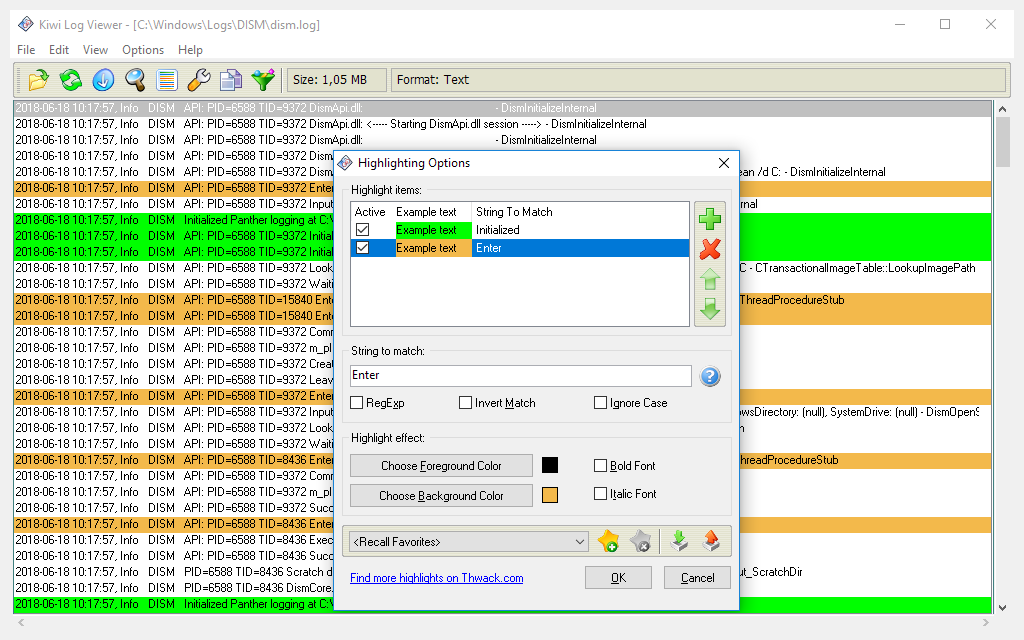
  • Stay on top of your logs with automatic highlighting options
  • Save memory and monitor log files of any size
  • Features Overview

    Kiwi Log Viewer for Windows is a handy tool for monitoring log files.

    Search, filter, and view log files
    Display log files in an easy-to-read tabular format and choose various search and filter options.
    Search log files of any size
    Kiwi Log Viewer can read files up to 14TB to make sure you can view and search all logs you need regardless of size.
    Easily monitor changes to a specified log file in real time
    Use file tailing to monitor new entries to a log file in real time.
    Highlight key log entries
    Apply highlighting rules to detect the most important messages quickly.
  • Read, search, and filter log files in a simple tabular format

    Read, search, and filter log files in a simple tabular format

    Kiwi Log Viewer displays text-based log files in a tabular format. You can copy selected rows in tab-delimited format or click-select-copy any part of the row text.

  • Display new entries to log files in real time

    Display new entries to log files in real time

    Thanks to the file tailing feature, you can monitor the specified log file for changes and view any new data added in real time.

  • Stay on top of your logs with automatic highlighting options

    Stay on top of your logs with automatic highlighting options

    Text string matching allows important text to be automatically highlighted by using colors or bold/italic font emphasis. Text matching options include simple sub-string matching or more powerful PERL-style regular expression (regex) matching.

  • Save memory and monitor log files of any size

    Save memory and monitor log files of any size

    Kiwi Log Viewer chunk mode allows only a small section of the file to be read from disk at a time, saving memory and allowing you to view and search a file typically too big to fit in memory. Kiwi Log Viewer can read files up to 14TB (if the OS supports it).

Next Feature:
See More Features +
See Less Features -

Key Features

Features Overview Kiwi Log Viewer for Windows is a handy tool for monitoring log files.
Read, search, and filter log files in a simple tabular format

Read, search, and filter log files in a simple tabular format

Kiwi Log Viewer displays text-based log files in a tabular format. You can copy selected rows in tab-delimited format or click-select-copy any part of the row text.
Close Feature
Display new entries to log files in real time

Display new entries to log files in real time

Thanks to the file tailing feature, you can monitor the specified log file for changes and view any new data added in real time.
Close Feature
Stay on top of your logs with automatic highlighting options

Stay on top of your logs with automatic highlighting options

Text string matching allows important text to be automatically highlighted by using colors or bold/italic font emphasis. Text matching options include simple sub-string matching or more powerful PERL-style regular expression (regex) matching.
Close Feature
Save memory and monitor log files of any size

Save memory and monitor log files of any size

Kiwi Log Viewer chunk mode allows only a small section of the file to be read from disk at a time, saving memory and allowing you to view and search a file typically too big to fit in memory. Kiwi Log Viewer can read files up to 14TB (if the OS supports it).
Close Feature

FAQ: Questions, meet answers.

  • What is the difference between the Kiwi Log Viewer licensed version and the free trial?

    The free trial of Kiwi Log Viewer includes the following features:

    • Open recent files (two files)
    • Color highlighting (up to two text matches)
    • Saving of favorite highlights
    • Importing/exporting of highlights
    • Runs on Windows 2000 onwards
    • Open files up to 700MB in size
    • Return up to 100 matches of filtered results
    • Monitor log files for new data and display it in real time
    • Detailed help file
    • Copy selected rows to the clipboard in tab-delimited format
    • Search for a text string within the file

    The licensed version of Kiwi Log Viewer includes all the features in the trial version, plus:

    • Up to 10 entries in the Recent File list
    • Up to 100 text matches per highlight
    • Return all filtered results
    • Open files of any size (files up to 14TB can be read (if the OS supports it)
    • Drag & Drop file support
    • Ability to click-select-copy any part of the row text

  • What’s the difference between Kiwi Syslog® Server and Kiwi Log Viewer?

    Kiwi Log Viewer is a simple-to-use tool for displaying logs in an easy-to-read format allowing you to see changes to specified log files in real time. As only a small section of the file is read from a disk at a time, it saves memory and allows you to view a file typically too large to fit in memory.

    Kiwi Syslog Server is a standalone syslog server for centralizing your log management, including syslog messages, SNMP traps, and Windows event logs. It includes a powerful rules engine allowing for automatic response to syslog messages while receiving real-time alerts based on critical events or archiving messages for compliance and regulatory purposes. It includes web access to ensure you can get to your syslog data wherever you are.

  • Where can I find support information, training, onboarding, and technical documentation?

    The Success Center is your home for onboarding, training, new user information, the product knowledge base, and official product documentation.

    The customer portal is where you can submit a help desk ticket, find all of the information about the products you own, and see available hotfixes and upgrades as well as training opportunities for your products.

    • Submit a help desk ticket so that our team of support reps can assist you in getting your product back up and running
    • Log in to your account to see all of your product information including licenses, renewal dates, downloads and upgrades, and hotfixes

  • How do I connect with other SolarWinds users?

    SolarWinds solutions are rooted in our deep connection to our user base in the THWACK® online community. More than 150,000 members are here to solve problems, share technology and best practices, and directly contribute to our product development process.

    • See our product roadmaps and what we’re working on
    • Watch and chat live with our Head Geeks who explore real-world technology issues and walk through practical solutions
    • Find a SolarWinds User Group near you to meet with SolarWinds staff and customers just like you

    Join our community today and become a SolarWinds pro in no time

  • System Requirements

    CPU

    • 1 GHz

    Memory

    • 256 MB

    Hard Drive

    • 20 MB
     

    Operating System

    • Windows Server 2016
    • Windows Server 2012 and 2012 R2
    • Windows 2008 R2
    • Windows 10
    • Windows 8.1
    • Windows 8
    • Windows 7

Take The Next Step

Let’s talk it over.
Contact our team. Anytime.
{#Contact Phone#}
{{STATIC CONTENT}}
{{CAPTION_TITLE}}

{{CAPTION_CONTENT}}

{{TITLE}}