- Events
-
Partners
- Government
- Customer Portal
- Contact Us
- Contact Sales
-
English
Understanding end-user experience is key for FTP client web interface ease of use. SolarWinds Serv-U offers an automated and intuitive FTP web client interface, so end users can more easily implement a file transfer no matter their experience level.
From your centralized client FTP console, users can easily upload, download, request, and manage file transfers as needed. End users can also keep folder trees and file tree structures intact, delete multiple files at once, and pause or resume transfers as needed. They can also drag and drop from Windows Explorer or other file managers.
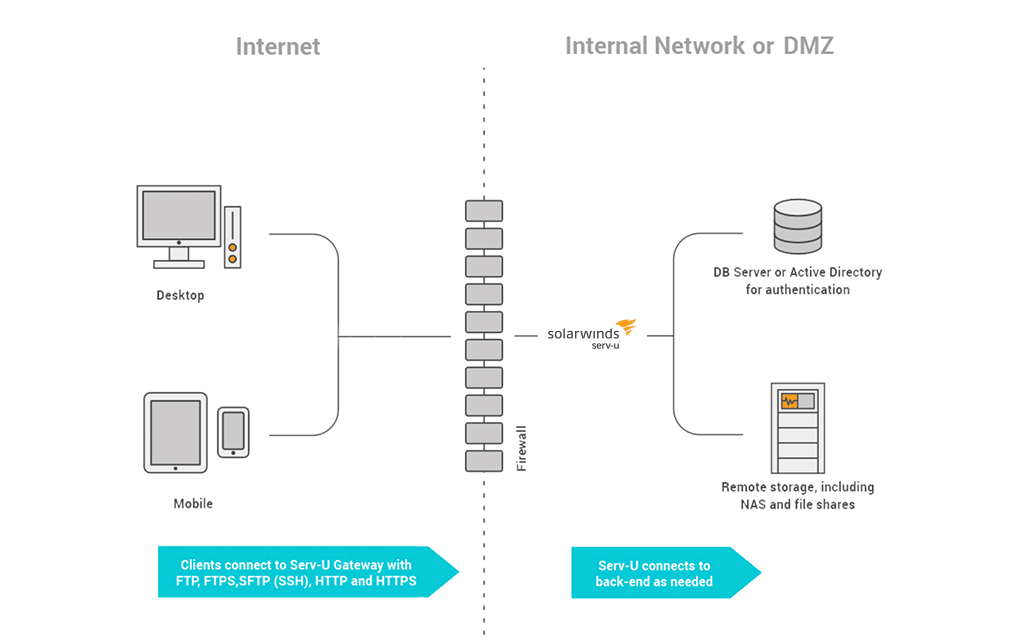
Security is crucial to any comprehensive FTP file sharing process. With multi-industry security protocols and encryption such as FTPS (FTP over SSL/TLS), SFTP (FTP over SSH2), HTTP, and HTTPS (HTTP over SSL), this FTP tool is built to help ensure your files are delivered securely over IPv4 and IPv6 networks. Serv-U is also built to comply with numerous security frameworks, allowing businesses to implement easy file sharing without worrying about compliance regulations. Additionally, Serv-U includes the ability to require confirmation before overwriting to help ensure you don’t lose key information.
A successful FTP web client needs to remain functional and secure, but it should also operate as efficiently as possible. With automated credentials sync, you can choose to either use existing Active Directory access credentials for the FTP interface or establish new FTP credentials. This can help you save time and configure your web FTP client tool to meet your needs.
Serv-U Web Client allows users to access file transfer web interfaces from their mobile devices, so file sharing can happen from anywhere at any time. With this web client interface, end users can view file transfers, transfer multiple files at the same time, and manage drag-and-drop files from the Serv-U server—all from their handheld mobile devices.
A web server FTP client offers a way to transfer files by uploading files from the end-user device to the web server or downloading files from the web server to the local device. The file transfer protocol (FTP) allows users to access the web server’s file system.
The central concept of an FTP client is the FTP server. Your file transfer protocol server provides an intermediary location for file transfers from one device to another. For secure and reliable file sharing, FTP servers are used as a centralized location where end users can upload their files and download files sent to the FTP server. Since the FTP server is web-based, this can allow users to transfer a large amount of data all at once, without the limitations of device-specific file transfer. IT management can also use FTP servers to understand the scope of file transfers, with file communications available in a single location for clearer monitoring and management.
Your web-based FTP client is the web interface allowing end users to transfer and receive files from the FTP server. The web client is the point of access for clients and FTP management professionals, which means the quality and security of web client software can have a major impact on the effectiveness of your FTP file sharing process. Comprehensive FTP software is designed to provide features to help make file transfers more efficient and user-friendly, while maintaining stringent security standards that can satisfy regulatory audits and help ensure secure file sharing to communicate sensitive financial information and protected data.
An FTP server can also provide a unique opportunity to manage and oversee your file transfers from a centralized location, helping to ensure data communicated between two devices is visible from your FTP management software. By reducing time, hassle, and risk in file transfers, an FTP web client can provide crucial benefits for businesses large and small.
To better understand how SolarWinds Serv-U is designed to provide an effective file sharing web server solution, it’s important to understand how an online FTP web client works.
An FTP web client is the interface that receives and transmits files to your FTP server, but there are other features a sophisticated FTP service can offer to help streamline managed file sharing operations to more effectively communicate data among devices.
Key FTP client capabilities should include:
Your FTP client web interface offers a door into your FTP server and is important for ensuring efficient file transmissions. Even the most effective FTP server can quickly lead to downtime without streamlined FTP client software. By combining a high-quality FTP server with important web client capabilities, you can protect and transfer files safely at whatever speed and volume your business requires.
With Serv-U MFT, you gain large file transfer abilities and can transfer files of over 2GB, with additional memory available using intuitive plug-ins.
Serv-U can help you send files with their existing tree structure, so you don’t have to reorganize files later. With binary SFTP transfer available from any internet-connected device, you can also communicate files to the FTP server without the risks potentially involved with a direct transfer to your computer.
In addition to these end-user experience benefits, Serv-U MFT is also built to include:
With SolarWinds Serv-U MFT, automation is built to meet security. Serv-U offers an intuitive FTP interface, combined with the security and efficiency. To save your business money and hassle, SolarWinds Serv-U is designed to be a highly effective solution for receiving and sending files. With Serv-U, FTP technology isn’t just a way to send files from point A to point B—it’s an intuitive service allowing users to effortlessly interact with the file sharing process.
Other SolarWinds tools designed to help you support FTP Server safety:
Related resources:
Sharing large files or sensitive data is a common issue in almost every organization but is possible to do with ease. Working with multiple external partners or within a distributed team requires a simple and fast solution for secure file sharing. A new web-based FTP client can be a perfect solution while keeping full control over the file sharing settings and policies. With Serv-u embedded web-based FTP client, an employee can access shared files using modern GUI and transfer files to and from your file server, including creating and deleting directories, or requesting files from other people. FTP Web Client enables you to view remote images as thumbnails generated on the fly to conserve bandwidth and increase transfer speed, easily share photo albums using the built-in slideshow feature or play audio and video files in the built-in media player. For smooth international cooperation, Serv-u web-based FTP client supports eleven languages.
You don’t need to worry about the security of confidential information when using Serv-u FTP web client because it uses FTP, HTTP, and FTPS(FTP over SSL/TLS). This FTP tool helps to ensure security of the transferred data in IPv4 and IPv6 networks. You can optimize the performance creating custom limits and rules at a granular level to control resource usage on the server.
Using third party digital certificates guarantees the identity of the server to clients.
Serv-u new FTP Web Client allows you to host multiple domains on the same IP address as well as port and use multiple sources of authentication on the same domain (local user database, NT/SAM, ODBC).
A web server FTP client offers a way to transfer files by uploading files from the end-user device to the web server or downloading files from the web server to the local device. The file transfer protocol (FTP) allows users to access the web server’s file system.
The central concept of an FTP client is the FTP server. Your file transfer protocol server provides an intermediary location for file transfers from one device to another. For secure and reliable file sharing, FTP servers are used as a centralized location where end users can upload their files and download files sent to the FTP server. Since the FTP server is web-based, this can allow users to transfer a large amount of data all at once, without the limitations of device-specific file transfer. IT management can also use FTP servers to understand the scope of file transfers, with file communications available in a single location for clearer monitoring and management.
Your web-based FTP client is the web interface allowing end users to transfer and receive files from the FTP server. The web client is the point of access for clients and FTP management professionals, which means the quality and security of web client software can have a major impact on the effectiveness of your FTP file sharing process. Comprehensive FTP software is designed to provide features to help make file transfers more efficient and user-friendly, while maintaining stringent security standards that can satisfy regulatory audits and help ensure secure file sharing to communicate sensitive financial information and protected data.
An FTP server can also provide a unique opportunity to manage and oversee your file transfers from a centralized location, helping to ensure data communicated between two devices is visible from your FTP management software. By reducing time, hassle, and risk in file transfers, an FTP web client can provide crucial benefits for businesses large and small.
To better understand how SolarWinds Serv-U is designed to provide an effective file sharing web server solution, it’s important to understand how an online FTP web client works.
An FTP web client is the interface that receives and transmits files to your FTP server, but there are other features a sophisticated FTP service can offer to help streamline managed file sharing operations to more effectively communicate data among devices.
Key FTP client capabilities should include:
Your FTP client web interface offers a door into your FTP server and is important for ensuring efficient file transmissions. Even the most effective FTP server can quickly lead to downtime without streamlined FTP client software. By combining a high-quality FTP server with important web client capabilities, you can protect and transfer files safely at whatever speed and volume your business requires.
With Serv-U MFT, you gain large file transfer abilities and can transfer files of over 2GB, with additional memory available using intuitive plug-ins.
Serv-U can help you send files with their existing tree structure, so you don’t have to reorganize files later. With binary SFTP transfer available from any internet-connected device, you can also communicate files to the FTP server without the risks potentially involved with a direct transfer to your computer.
In addition to these end-user experience benefits, Serv-U MFT is also built to include:
With SolarWinds Serv-U MFT, automation is built to meet security. Serv-U offers an intuitive FTP interface, combined with the security and efficiency. To save your business money and hassle, SolarWinds Serv-U is designed to be a highly effective solution for receiving and sending files. With Serv-U, FTP technology isn’t just a way to send files from point A to point B—it’s an intuitive service allowing users to effortlessly interact with the file sharing process.
Other SolarWinds tools designed to help you support FTP Server safety:
Related resources:
Sharing large files or sensitive data is a common issue in almost every organization but is possible to do with ease. Working with multiple external partners or within a distributed team requires a simple and fast solution for secure file sharing. A new web-based FTP client can be a perfect solution while keeping full control over the file sharing settings and policies. With Serv-u embedded web-based FTP client, an employee can access shared files using modern GUI and transfer files to and from your file server, including creating and deleting directories, or requesting files from other people. FTP Web Client enables you to view remote images as thumbnails generated on the fly to conserve bandwidth and increase transfer speed, easily share photo albums using the built-in slideshow feature or play audio and video files in the built-in media player. For smooth international cooperation, Serv-u web-based FTP client supports eleven languages.
You don’t need to worry about the security of confidential information when using Serv-u FTP web client because it uses FTP, HTTP, and FTPS(FTP over SSL/TLS). This FTP tool helps to ensure security of the transferred data in IPv4 and IPv6 networks. You can optimize the performance creating custom limits and rules at a granular level to control resource usage on the server.
Using third party digital certificates guarantees the identity of the server to clients.
Serv-u new FTP Web Client allows you to host multiple domains on the same IP address as well as port and use multiple sources of authentication on the same domain (local user database, NT/SAM, ODBC).
Serv-U File Transfer Protocol Server
Get enhanced security protocols for safe and trustworthy FTP client file transfers
Use an intuitive FTP client control center with an automated interface for user-friendly transfers
Enjoy mobile FTP client access with drag-and-drop file transfer capabilities